
Change Owner v1.0
Tue, 04/24/2007 - 08:28 — Ciprian
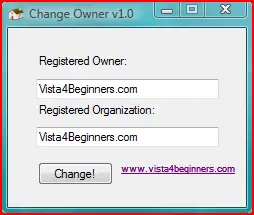
 These days we managed to develop another small tool for Windows Vista users. As you can tell from its name, this tool allows you to change the registered owner and organization for your Windows Vista installation. You don't have to edit any registry keys. Just download our tool, run it, type the desired owner and organization name and press the Change button.
When you start it, Change Owner automatically loads the current registered owner and organization. To modify them just type the new values and press the Change button.
Just like CSRF v1.0, Change Owner v1.0 is distributed using a Creative Commons Attribution-Noncommercial 3.0 License.
This tool is offered "as is" with no warranties. Change Owner v1.0 was designed and tested on Windows Vista and on our systems it worked with no problems. Also, it should work on systems with Windows XP and .NET Framework 2.0 installed. If you discover any bugs please feel free to report them to us.
Related articles:
Change the System Restore Frequency with CSRF v1.0.0.0
Manage User Accounts
Change the permissions and take ownership of your files and folders
| Attachment | Size |
|---|---|
| Change_Owner_v1.0.zip | 53.09 KB |

This work is licensed under a Creative Commons Attribution-Noncommercial 3.0 License.
Microsoft, Windows and the Windows logo are either registered trademarks or trademarks of Microsoft Corporation in the United States and/or other countries. Microsoft Corporation in no way endorses or is affiliated with www.vista4beginners.com.
All other products mentioned are registered trademarks and/or trademarks of their respective companies.
Comments
thank you so much
my computer shop set up my new Vista with my "real" name as user UGH!
I'm eternally grateful to the person who developed this tool that's let me reclaim my true identity :)
We are glad this small tool
We are glad this small tool was useful for you!
Thanx
i heard that vista have some bugs, but still i thought it will be nice stuff... your website is really useful, thanx for everything(and for this little tool alsobecause i was trying to change it for 4 hours... ;)
Thanks a million! I to had
Thanks a million! I to had the same problem as jb5quid and also spent hours on this. Even going thru the registry! Will it change C:\user\blahblah on reboot? I have been trying to change this too. Also trying to map it to another hard drive? I moved all the folders but C:\user\blahblah keeps making new ones?
Unfortunately it won't
Unfortunately it won't change the C:\users\username folder. That will remain the way it was. All you can do is to move the My Documents, My Music, My Pictures and Downloads folders to other locations.
Yeah, sure... Create a new
Yeah, sure... Create a new account & move your files (and/or folders), np! :)
Wow thank u guys...it
Wow thank u guys...it actually worked!!!.....its been buging mee since day one (2 weeks ago) lol
tyvm
Thanks a lot guys! this tool works great and i love its simplicity (just hit the button!) tyvm!
How can you get it to change
How can you get it to change from "owner" to the name you want in Task Manager?? I've changed it using the regedit option and this download. It still says "owner" under processes.
It worked brilliantly thank
It worked brilliantly thank you
Post new comment