
How to check your Network Connection Status
 One of the major changes in Windows Vista is the introduction of the Network and Sharing Center. Even if it is very well structured and quite easy to use, some users still might have some trouble in accommodating to it. Configuring your network settings is easier than ever but even so, finding some configuration options might be a difficult task if you are accustomed with Windows XP.
For example, accessing your network connection status is not as straightforward as it is in Windows XP.
In Windows XP, you just have to double click on the appropriate network icon from the taskbar and the Network Connection Status is opened.

In the General tab you see details such as the network speed or the packets that are being sent and received.
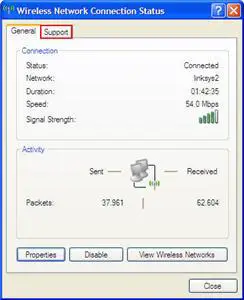
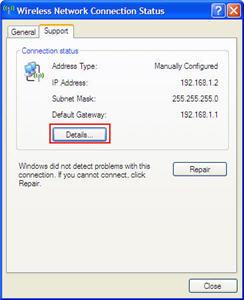
If you click on the Support tab you can see your IP address and Subnet Mask.
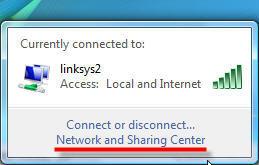
In Windows Vista, if you double click on the network icon you will see a list with the networks you are connected to.

To access the Network Connection Status, click on the Network and Sharing Center link.
Here you will see a more detailed list with the networks you are connected to. Click on the View status link for the network you want to check.
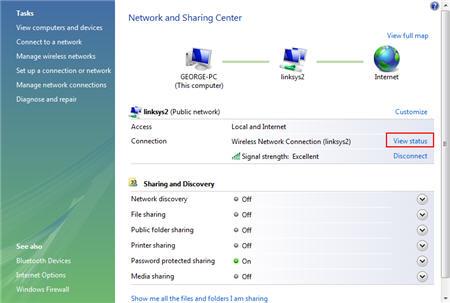
The Network Connection Status window will open. As you can see, it is a bit different in comparison with Windows XP.
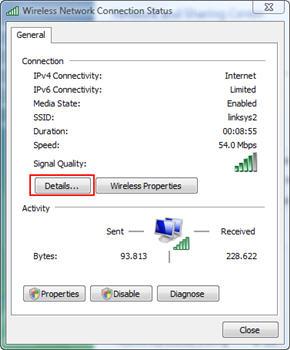
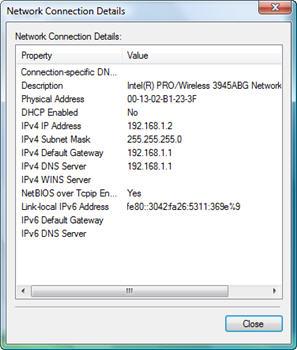
The main difference is that the Support tab no longer exists. However you can still see details such as your IP address, Subnet Mask and so on. All you have to do is click on the Details button and you will have access to even more information than before.
Related articles:
Windows Network Diagnostic - diagnose network problems the easy way
How to setup a wireless connection
How to Map a Network Drive
How to enable network discovery and file sharing
Offline Files - How To Work With Network Files When Offline

This work is licensed under a Creative Commons Attribution-Noncommercial 3.0 License.
Microsoft, Windows and the Windows logo are either registered trademarks or trademarks of Microsoft Corporation in the United States and/or other countries. Microsoft Corporation in no way endorses or is affiliated with www.vista4beginners.com.
All other products mentioned are registered trademarks and/or trademarks of their respective companies.
Comments
Private Network
It's all very simple until I want to share media with my Xbox 360. It keeps defaulting as 'unknown network' or 'public network' after each restart. Is there a way to keep it as a private network? Public network disables media sharing.
Seing share drive with VISTA
Just receive a VISTA machine and I've encountered the following problems :
Can't see any share drive from XP machines although I could ping these machines. I'm also unable to get to these PC by either entering their IP or full address i.ec \\machinename\sharedrive.
I was able to connect to all network printer and the internet.
HELP !!!!!!!
Teach XP and Vista to play
Check this article called Teach XP and Vista to play nice on networks.
Network and sharing center
I've lost my "view status" when I've used my dial-in connection. Rebooting hasn't returned the "view status" link.
Wireless
I am in the dark when it comes to technology. I just bought a DELL laptop and it has a wireless card. I was able to connect to the internet for the first week. Now it say that it is unable to find any networks, but my PC at homes finds them perfectly... Is my laptop the problem or is it my router? Any suggestions?
Wireless
Make sure that your new DELL laptop doesn't have a little switch to turn on the wireless that's built into it. If it does turning it on may be all that's needed.
You've not given much detail of your home network and the computers there, so it's difficult to know exactly what you've got there.
Is the PC a wired network connection that plugs in with a Network Cable (called CAT5 or Ethernet Cable) with fat phone plug type of connectors? If so that may be why the PC works ok.
I'm guessing that you already know wether you actually have WiFi Wireless in your network there. I'm curious if you configured it, or if someone configured it for you? If it's already set up and wireless is actually turned on on your new laptop, then you ought to be able to see the Network Name (called an SSID) in Windows Vista. Connecting to it should be fairly trivial. You usually have to supply a Network Key, depending on if, or what type of, security you have in your home WiFi Wireless Network. Something assigns IP Addresses and Network Router Gateway and DNS Servers to computers automatically. That something is called a DHCP Server. One of your networking gear should be providing that function. It should JUST WORK.
If it still doesn't, you need another Laptop or Wireless Client to confirm that your Wireless Network is in fact working. If it works with another computer, wirelessly, then chances are the problem is in your laptop.
* I do networking for mobile platforms mainly Marine/Motor Yachts. I have a web site: http://www.marinetelecom.net
Hello sir, Can i use this
Hello sir,
Can i use this content for educational purpose?
Thanks
NEED HELP PLS
when i connect to broadband to my vista - compaq laptop .in status bar shows ACCESS- ONLY LOCAL insteadf of 'local and internet; on ipv4. so i can ping but cannot connect to internet. HOW can i change the setup?
Thanks
Internet connectivity
when i connect to broadband to my vista - HP laptop .in status bar shows ACCESS- ONLY LOCAL instead of 'local and internet; on ipv4. so i can ping but cannot connect to internet. HOW can i change the setup?
Thanks
HELP
i cant seem to see the network icon on the notification taskbar n i can't click the checkbox asking whether we want to always show the icon, same goes for the volume icon. i can click it for the power and clock box. anyone know what;s the problem??
Post new comment