
How to find the Folder Options menu
Fri, 02/23/2007 - 12:43 — George
 One of the first things I do after I install a Windows Operating System is to make sure I have access to all hidden folders and that i can see the extension for all files, including common files like ".txt" or ".doc". That is because I want to have complete access to every file or folder from my system.
To make these settings in Windows XP it was pretty easy - while I was browsing through the folders on my system, I selected Tools and then Folder Options from the top menu of Windows Explorer.
When I used Windows Vista for the first time I was a bit surprised to see that the Tools menu is nowhere to be found in Windows Explorer. So where did it go?
It seems that it was hidden from the Windows Explorer default interface. In order to access it, press the ALT key on your keyboard and the old menu will appear.
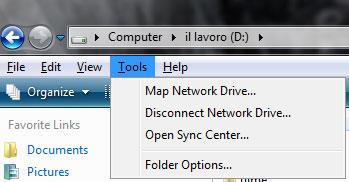
Another fast way to find the Folder Options is to use the search box from the start menu. Simply type "folder options" in the search field and the first result should be the Folder Options shortcut.
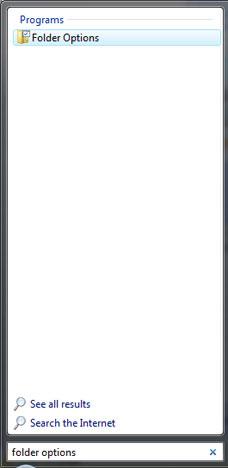
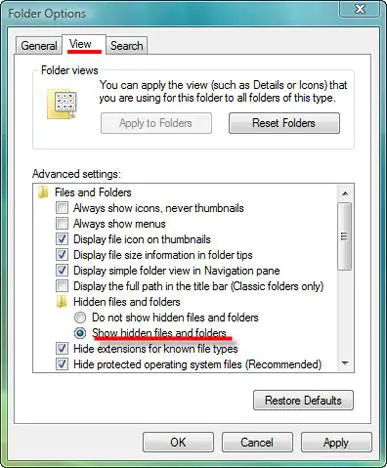
Click on the it or press the Enter key to open it. Go to the View tab and make the settings you want.
If you want to use the new Control Panel, you need to go to Appearance and Personalization and then click on Folder Options.
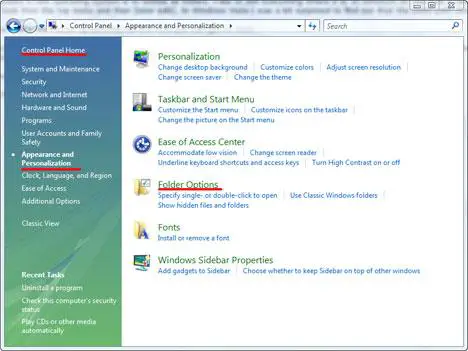
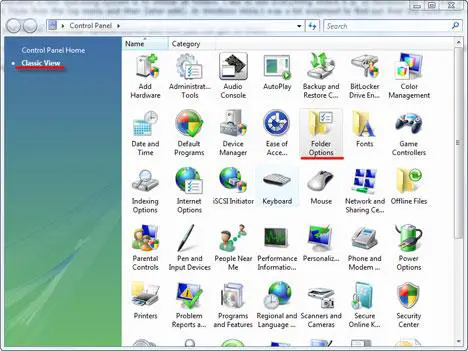
If you use the Classic View you will see it in the list of items starting with the letter "f".
Related articles:
Enable the "Copy To Folder" and "Move To Folder" options in your right click menu
Windows Explorer Tips & Tricks

This work is licensed under a Creative Commons Attribution-Noncommercial 3.0 License.
Microsoft, Windows and the Windows logo are either registered trademarks or trademarks of Microsoft Corporation in the United States and/or other countries. Microsoft Corporation in no way endorses or is affiliated with www.vista4beginners.com.
All other products mentioned are registered trademarks and/or trademarks of their respective companies.
Comments
Tools menu missing ?
Please sir,
Open up an explorer window (say for example, by clicking on the computer icon in the desktop), and then press and hold the left ALT key.
You'll see the tools menu and under it you'll see the folder options.
Before you bash windows vista next time, how about if you learn how to use it next time ?
Thanks
Reply
Nobody is bashing Windows Vista. We are just telling people where to find the Folder Options menu.
Anyway... thank you for the tip. We updated the article and now it includes the tip you posted.
There is an other way : just
There is an other way : just click on "Organize" and select "Folder and search options"
:-p
Nobody's bashing anything
Nobody's bashing anything here...
Anyway, i like the tips, keep them coming!
I will most certainly bash
I will most certainly bash this confusing and poorly put together operating system.
I can't think of an excuse for something this 'counter-intuitively' put together.
Our IT people and computer geeks I know are telling us to AVOID this system.
And word is that Microsoft is kicking it to the curb.
Thanks for this helpful site, though!
My senior Mom who's used computers for years was completely lost until we found your site.
After 6 months, she absolutely hates Vista!
Yet another way...
Just click on the "Organize" button, and then click "Folder and Search Options".
what if "Folder and Search
what if "Folder and Search Options" is grayed out?
Menu Bar
Kind of a week article, this one. To have the menu bar always shown, select "Menu Bar" from Organize > Layout. Then you can always see the Tools menu.
Windows Explorer
This is all fine....
You get to the "Folder View" settings somehow...
Set whatever you want... save settings...
Reopen the Windows Explorer and Vista will dismiss all your settings.
That is one of the new "Vista WOW!:(((" features.
Some registry tweaks will patially fix the problem for the HDD's, however CD/DVD's will be shown with the "Vista" settings, no metter ho many times you will try to save your settings.
The "Cool" view of the "Product" - means nothing if it is unable to serve the customer.
At this stage I will not advise my customers to install Vista.
Thank you for digging...
i need your help
hi there,
my computer suffered from a worm few days ago & i completely removed it from the system
it changed few things in my system & i'm trying to fix them, one of these things is that it disabled the folder options, i tried all your suggestions but i can't find it in anywhere
so i was wondering if you might know a command that can enable the folder options in my system again, if you do please let me know & i'll be more than thankful for you
Post new comment