
How to disable UAC
 UAC or User Access Control is a new feature of Windows Vista that is meant to enhance the security of your system. Each time an application is installed or whenever an important system change is made by the user or by a running process, the screen is blacked out and temporarily disabled and a dialog is shown with the choices to allow or deny the action.
If the logged user is not an administrator, Windows Vista will also ask for the administrator password. While this helps keeping your system safer from threats, it can also be very annoying and sometimes confusing.
In this guide we will show you how to disable this feature of Windows Vista. Before we start, we must remind you that disabling UAC is not recommended by Microsoft because it can expose you to a lot more security threats. If you still choose to disable it please make sure you have proper security in place for your system.
To disable the UAC, enter the Control Panel and type UAC in the search box.
The first result returned by the search will be User Accounts – Turn User Account Control (UAC) on or off.
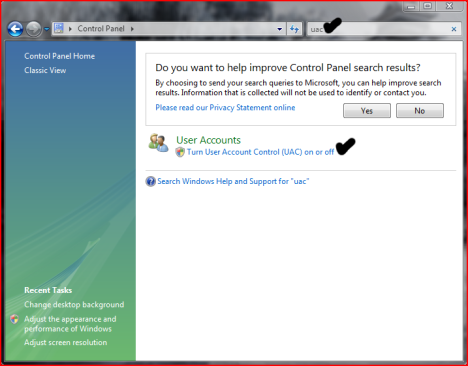
Click on it and the UAC window will open. Deselect the option Use User Account Control (UAC) to help protect your computer and press the OK button.

Windows Vista will ask you to restart your computer. After the restart, UAC will be disabled and all the confirmation requests will no longer bug you.
Related articles:
Have a better UAC experience with Norton User Account Control
Disable User Account Control (UAC) for certain Windows Vista applications
Tweak the User Account Control (UAC)
Manage User Accounts
Windows Vista Security Center
Recommended articles:
Windows 7: What is UAC & Why You Should Never Turn It Off
Windows 7 vs Windows Vista: The UAC Benchmark
Running Vista Every Day! - UAC – The Good and The Bad
4 Ways to Make UAC Less Annoying on Windows Vista

This work is licensed under a Creative Commons Attribution-Noncommercial 3.0 License.
Microsoft, Windows and the Windows logo are either registered trademarks or trademarks of Microsoft Corporation in the United States and/or other countries. Microsoft Corporation in no way endorses or is affiliated with www.vista4beginners.com.
All other products mentioned are registered trademarks and/or trademarks of their respective companies.
Comments
Admin rights
Can you help with a problem I am having with Vista permission?
I quite like this idea of UAC. I mean I wouldn't want any programs installing I havent asked.
But one issue I do have is with the free McAfee security (or Norton I forget which) When it asks if I want to download updates I say yes. Then it starts to install them. It does most of them, but there is one or two things it cant update and says "We were unable to install updates as you do not have admin permission" But I have checked in my user accounts and both users, myself and the girlfriend, both do have admin accounts and not standard accounts.
Do you know about this problem or how I can fix it without switching off UAC?
What version are you using?
It depends on the version of Mcafee you are using. You might use an older version which is not too compatible with Windows Vista. You should try to see if they offer any upgrades. This should not happen if you use a Windows Vista compatible security solution.
Reply:
you can turn the "UAC" on and off so just turn it off then turn it back on when your done.
i cannot turn on my uac back.
i cannot turn on my UAC.why is that so?pls help me
i checked it again but it doesnt work after i reboot my pc.it is still unchecked
Vista security
Not too sure about the version of McAfee. It was bundled free with the laptop I bought.
If I uninstall and removed McAfee, how secure is Vista security on it's own?
Install other solutions
You should use other security solutions. Vista is not safe enough on its own. Check out this article for some free security solutions.
Vista security
Though Vista is Secure enough but u simply cannot rely on this u must use updated & compatible Antivirus solutions.
It's beyond overkill
If it only did the annoying pop-up when a program was being installed, maybe...though if it's a program being installed remotely, any good firewall/antivirus/malware should stop that activity. I found UAC was popping up anytime I clicked an icon to open an already installed program, and/or opening any program for the first time.
It's annoying, lame, and so very, very Microsoft...
Admin rights
Every time I install or download any new software, I am being asked for password of Admin despite of being in admin account. And even after typing the password its denying to continue the download/installing process.
Could you please suggest me as what should be done?
UAC
I have a problem with UAC, i seem to have forgotten or changed the password and i dont have a CD to do a full install is there some way in which i can remove User account control without accessing it directly
Thanks
Post new comment