
How to setup a wireless connection
Fri, 01/19/2007 - 21:29 — Ciprian
 In this tutorial we will show you how to connect to a wireless network using Windows Vista. As you will see by yourself this is a pretty simple procedure. You don't have to be a computer genius to connect to a wireless network. All you have to do is follow these simple steps:
First, go to "Start Menu" -> "Control Panel" -> "Network and Internet".
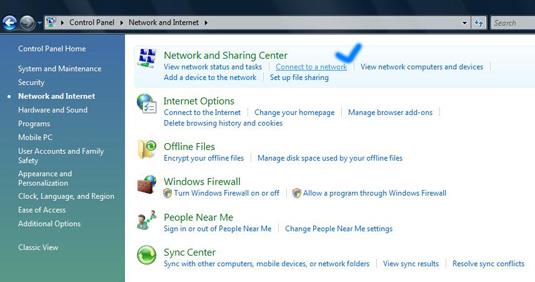
Now... go to "Network and Sharing Center" and select "Connect to a network", like it is shown in the above screenshot.
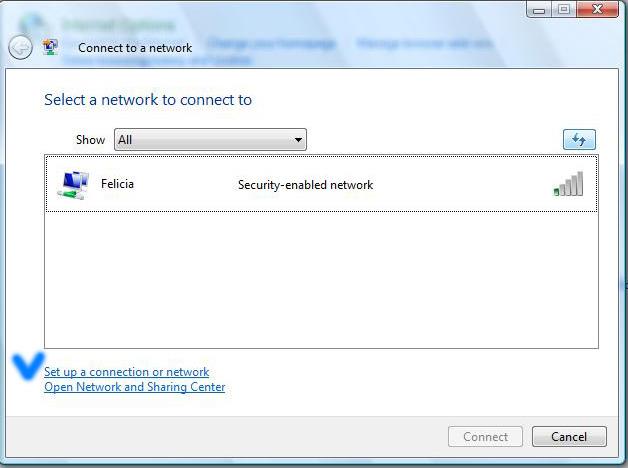
Choose "Show All" and hit the refresh button. If you find active network connections, select the one you want, click on "Connect" and don't forget to check the option that says "Start this connection automatically". If you check this option, Windows Vista will connect automatically to the selected network every time you log in.
If no networks are found, you can manually enter all network settings. This is how you do it:
In the “Connect to a network” window, click on “Set up a connection or network”, like shown in the above screenshot. Select “Manually connect to a wireless network” and press the “Next” button.
First, enter the “Network name”. In some cases the network name is identical to the name of the router - for example, my router is a Linksys, so the name of the network is Linksys.
Choose the security type and the encryption you use on your network. Now type the security key and check the option "Start this connection automatically".
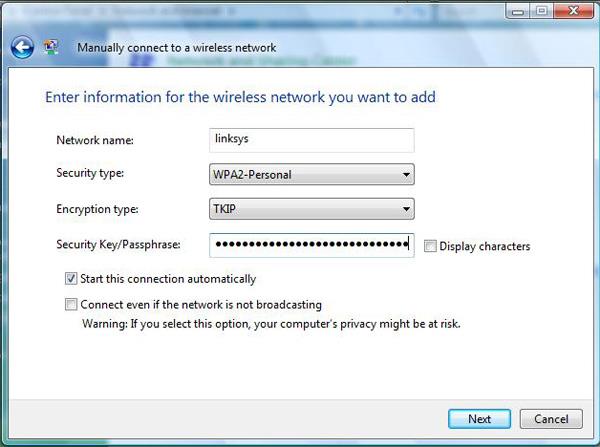
Click the "Next" button, then click "Connect to..." and that should be all. You successfully configured a connection to a wireless network.
Related articles:
How to check your Network Connection Status
Windows Network Diagnostic - diagnose network problems the easy way
How to setup a Bluetooth connection
How to enable network discovery and file sharing
Offline Files - How To Work With Network Files When Offline
How to Connect to Wireless Networks in Windows 7

This work is licensed under a Creative Commons Attribution-Noncommercial 3.0 License.
Microsoft, Windows and the Windows logo are either registered trademarks or trademarks of Microsoft Corporation in the United States and/or other countries. Microsoft Corporation in no way endorses or is affiliated with www.vista4beginners.com.
All other products mentioned are registered trademarks and/or trademarks of their respective companies.
Comments
still not connecting
I have gone through all these steps but am still unable to connect wirelessly It is coming up that my wlan is disconnected but my switch is saying its enabled What am I doing wrong ?
Did you enter
Did you enter the security key?
In order for others to help you, you should describe exactly what you did, what network configuration you have and so on.
If you don't give too many details, its less likely that somebody will be able to help.
Netgear Wi-Fi Router
Hi there,
I had the same problem so what i done was, i started from scratch. Disconnected the router resetting it first. I then reinstalled it writing down everything that i inputed, ie user name, password etc etc.
When you turn on the laptop (in my case) let it search for the IP address and it WILL eventually configure itself. BE PATIENT...
Regards
Jimmy
wireless,netgear,acer, very very anoyed
hi there i have a four week old acer aspire 9301awsmi. the laptop uses windows vista home premium i have the latest drivers installed and i have installed a patch from netgear which is dg834gv3_10Jan07_vista_3_3. im using a netgear wireless routerdg834gv3. at the moment im using a ethernet cable but the speed is so slow my computer can see the household network. it says there is limited conectivity. when i try to manualy connect its says the the action has been cancel this is beacause it was stopped by a user or timed out im going mad please help me i dont know what to do
Netgear Wi-Fi Router DG834v3
Hi there,
I have the same router an ACER 5610 laptop only 4 weeks old.
I had exactly the same problem as you did, so here's what i done and it work ok.
1, Uninstall router and resit it with the rest button at the back
2, Write down everything that you input on the setup
3, Ensure that you put in the correct username and password
4, Keep the name NETGEAR for the Wi-Fi configuration
5, Ensure that you put in the passphrase and WEP (key 1) exactly
6, Let the laptop find the NETGEAR name
7, Once it has found the name NETGEAR it will then configure the IP address from the router. (this for me took about 15mins) so be PATIENT...
Once that is done it should (like mine) tell you that it has CONNECTED SUCCESSFULLY TO NETGEAR.
PHEW
I hope this helps
Regards
Jimmy
router
Hiya jimmy
my friend has a acer laptop and has brought a netgear router they cannot get it to go on the internet it just says not conected but it is? also we dont no what cables need to go into the laptop and back off router, as the computoris'nt picking up the router its getting to be a pain could you pleae help me.
can't connect to the internet
Hi all,
my problem is that I can connect to the router but not to the internet. can somebody please tell me what might be the problem and how to fix it?
Thank you
Internet
See if youare able to ping any web sites,
network connection
ii a I am trying to transfer files from my old pc running windowsa xp to a new laptop running windows vista. I am using a lan crossover cable and have assigned IP adresses to both machines but i cannot get them to see each other. is there anything else that i am missing?
Re: Can't connect to the internet
If you can connect to your router or modem individually, but not through both at once, you likely just need to powercycle both your modem and router. Unplug each of them, wait about 10 seconds, and plug in your modem. Wait for all the modem's lights to come on, and then plug in your router as well. If you still can't get online, check that your router isn't set to use Static IP when you should be using DHCP, or vice-versa.