
Missing buttons from the Windows Contacts toolbar?
Wed, 04/16/2008 - 16:21 — Ciprian
 Many of our readers reported having problems with their Windows Contacts application. It seems that depending on how you configure Windows Explorer, it might happen that the traditional Windows Contacts buttons disappear. If you notice that you no longer have any of the following buttons: New Contact, New Contact Group, Import and Export, continue reading this tutorial and learn how to put them back on your toolbar.
First, launch Windows Contacts. Then, click on Organize and select Properties.

In the Contacts Properties window, go to the Customize tab. Here you can choose the folder type to be used for Windows Contacts. Most probably this is now changed to All Items, Documents or Music.
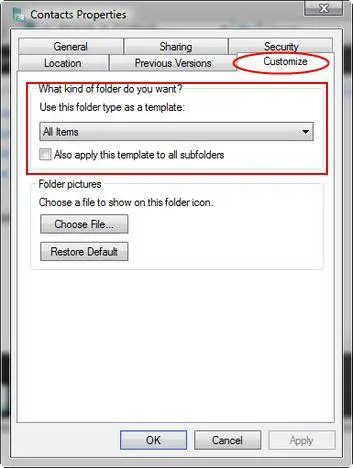
Beneath the text area that says 'Use this folder as a template', there is a selection box with items. Click on it, select Contacts and then click OK.
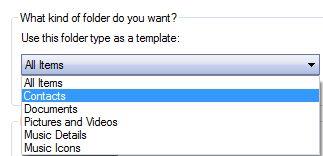
Your Windows Contacts toolbar will now return to normal.

Related articles:
Windows Contacts
How to create e-mail contact groups in Windows Vista

This work is licensed under a Creative Commons Attribution-Noncommercial 3.0 License.
Microsoft, Windows and the Windows logo are either registered trademarks or trademarks of Microsoft Corporation in the United States and/or other countries. Microsoft Corporation in no way endorses or is affiliated with www.vista4beginners.com.
All other products mentioned are registered trademarks and/or trademarks of their respective companies.
Comments
thanks - you are my saviour
thanks - you are my saviour - I am now going to see if you provide all the answers to my other frustrations in life!
Thanks fixed mine as well
Thanks for the fix works on the 32 bit versions as well as mine disappeared after a set of windows updates as had been there and hadn't done anything to my contacts list for at least 2 weeks maybe more since added new contact to it then the other day went to add another new contact and realised that those buttons were showing there anymore and only thing that had happened was some updates went on so much of been during these that it changed my settings. Thanks the screenshots made it so much easier to do as you can check back on pictures whilst fixing your own :-)
Windows Contacts missing buttons ...but
THanks your explanation was very clear, however I cannot use it at present. I seem to have lost the Customise and from your screendshot the sharing tabs from my properties tab. a you help please?
Thanks a lot
Thanks a lot
Windows Contacts
A great help ; Thanks.
Well laid out explaination.
Well done.!!!!
Windows Contacts Toolbar
Thank you for your help!
I had spent a good portion of my morning trying to figure out why my toolbar didn't match the instructions in the "Help" instructions for adding contact groups.
The change to the toolbar must have been the result of a Microsoft update, I know for darn sure I didn't personally change it.
Would have been nice if they let us know.
Windows Contacts
Amazing! Thank you, thank you, thank you.
Thank you!!
Thank you so much...i really thought i deleted it or something...tnxx..your the best!!
^_^
New Contacts Group button
Thanks for the clear guidance. I have fixed it. However, when I lost these buttons last time, I have lost all my contacts details. Do you know whether I can recover them?
Contacts
Thanks for this. It has solved my problem. Thank you once again.
Post new comment