
How to retrieve your Windows Vista password
Sun, 01/18/2009 - 13:03 — Ciprian
 One of our most popular articles is a guide on how to reset your Windows Vista password using the password reset disk. However, if you did not create a password reset disk and you have forgotten your password, you cannot login and use your computer. In these situations there are certain tools that can help you out, most of them being commercial solutions, such as Active Password Changer. Still, there exist also some free alternatives, one of them being Ophcrack. In this guide I will show how to get Ophcrack and how to use it to crack and retrieve your Windows Vista password when you don't have any password reset disk at hand.
First, go to the Ophcrack site and download the Live CD. Please make sure you download the Windows Vista Live CD and not the one for Windows XP. The Live CD is a disc image saved as an '.iso' file which you need to burn onto a CD. Use a good CD/DVD burning solution to write the image file on a blank CD. If you don't have any, you can try CDBurnerXP. It is free and it works very well.
Once the disc is ready, you need to boot directly from the CD you just created. If you don't know how to do this, please read this guide.
Once you manage to boot from the Ophcrack Live CD, you will have three choices on how to launch the tool. The first two options will launch Ophcrack in a graphic mode. If you have problems with the first mode, then reboot and choose the second. Depending on the hardware configuration, on some computers both modes will work. On the computers i have tested it, sometimes the first mode did not function properly but the second one always worked just fine.
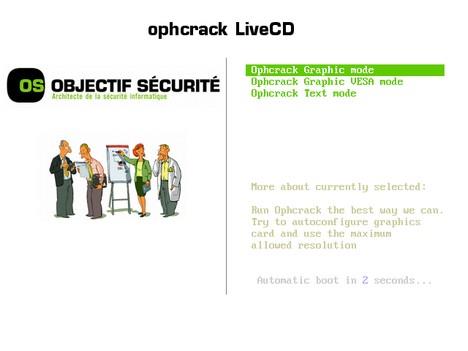
If you don't want any graphics, then choose the third option which will launch Ophcrack in text mode.
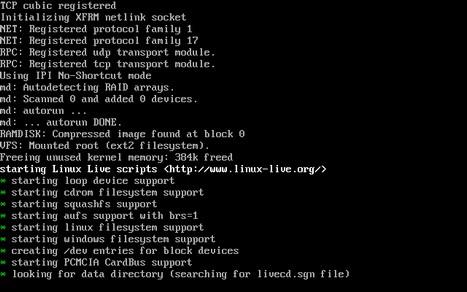
Once you have chosen a mode, Ophcrack will start loading and retrieving your passwords. This can take a few minutes, depending on your configuration and how strong the current passwords are. Please be patient and wait until the screens with text like the one below disappear and the graphical user interface is displayed.
Once the tool loads, it will show a screen like the one below. Please be patient as not all graphical elements will be shown at once. This is because Ophcrack will be busy cracking the passwords for all users registered on the PC.
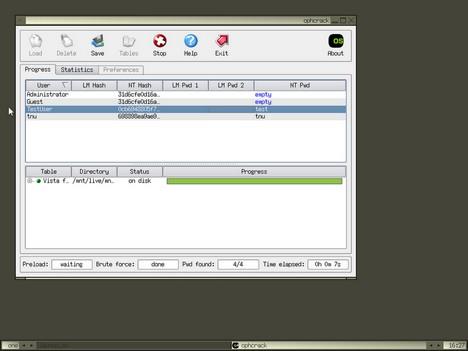
When finished, Ophcrack will show you all the registered users from your Windows Vista and their corresponding passwords in the NT Pwd column.
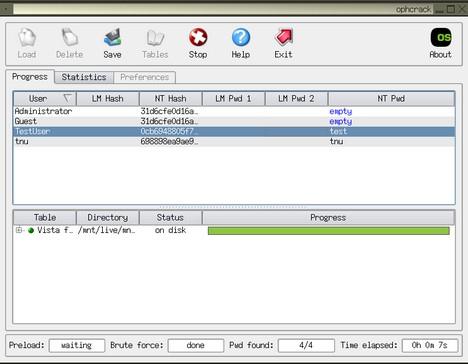
Write down the password for the user that interests you, reboot your PC and login to Windows Vista using the password you just recovered.
Related articles:
How to reset your password
Manage User Accounts
Change Owner v1.0
Recommended articles:
How To Boot your Computer from a Bootable CD or DVD

This work is licensed under a Creative Commons Attribution-Noncommercial 3.0 License.
Microsoft, Windows and the Windows logo are either registered trademarks or trademarks of Microsoft Corporation in the United States and/or other countries. Microsoft Corporation in no way endorses or is affiliated with www.vista4beginners.com.
All other products mentioned are registered trademarks and/or trademarks of their respective companies.
Comments
I dont get what u mean by booting from a CD/DVD
Is it only for me to run Ophcrack to boot my computer with CD/DVD to find the password??
If i lose the DVD/ CD will i still be able to open my computer ??
Booting from a CD/DVD
To learn how to boot from a CD/DVD please read this guide:
http://pcsupport.about.com/od/tipstricks/ht/bootcddvd.htm
To answer your 2nd question - you will be able to open your computer. Just read the instructions carefully, it is not complicated.
Free help
Make an other CD\DVD image :- )
You have to go into your bios
You have to go into your bios and change your bootup drive to your cddvd drive...ITs usually F2 to get to your bios screen..Change the settings under boot to your cddvd drive..
question
Every time I put the CD and boot it from the CD it all starts doing what you say it should do. I get to the screen where it gives you three different options for Graphic Mode, Text Mode and the other. Well, I have tried all three options and it starts to load the black DOS looking screen and then it gets to a point where it just stops!!???? Now, I don't know if I am just being too impatient or if it is truly locked up and won't go any further because it never gets to the part that you show in your second diagram. It never says the "starting Linux scripts...." it never has anything with the green * or anything like that. And when I just let it go and don't do anything then my computer just shuts down completely!!!?? What am I doing wrong? What is going on? Please help me because I am getting irritated but I am determined to figure this out so any help would be awesome. Thank you.
I've problems with using it
I've problems with using it in text mode. Can't use it in Graphics mode because the CD won't recognize my graphic drivers. It seems to have found the password and it says it has saved it in /tmp/ophcrack.txt
So I go and read ophcrack.txt and it has a hash code .. I'm not sure how to decode it.. Anybody can help? Thanks in advance ..
Here is the hash
8846f7eaee8fb117ad06bdd830b7586c
txt file
Where/how did you find the /tmp/ophcrack.txt file?
figured it out .... exit then
figured it out ....
exit then select "no" when asked
then type in the command
more /tmp/ophcrack.txt
It will then list the hash code and other information in the text file.
How do you decode the
How do you decode the password that is given in Hash code?
Unfortunately Ophcrack works
Unfortunately Ophcrack works only with simple and short password. If you try 10 letters password or a password with a number, Ophcrack will do no good.
Post new comment