
Top 10: Reasons Why Internet Explorer 7 Add-Ons Suck
Mon, 07/16/2007 - 07:31 — Ciprian
 Initially we wanted to check out the Add-Ons for Internet Explorer page to see the available offerings and try to create a "Top 10: Best Add-Ons for Internet Explorer 7". We browsed through most of the available Add-Ons and we barely managed to find some that are good enough to be included in a Top 10. However, we found lots of bad Add-Ons with little or no functionality and many other issues.
This is why we decided to cancel our "Top 10: Best Add-Ons..." and create "Top 10: Reasons Why Internet Explorer 7 Add-Ons Suck" instead:
Reason Number 10 - Little variety - at the time we created this article (July 14, 2007) there were only 500 Add-Ons available. 500 might seem a big number but if you consider that you have aproximately 10 pop-up blockers and at least 2-3 weather Add-Ons, you won't think 500 is too much. If you take into consideration the fact that Firefox has more than 1800 available extensions, you will start to think that 500 is way too little.
Reason Number 9 - Poor classification - the IE Add-Ons are split into the following categories: Security, Time Savers, Browsers and Entertainment. Having a small number of categories is not exactly a problem. However, the category names are not very inspired. For example, if you go to the "Time Savers" section you will find toolbars, clocks, debugging tools, developer tools, password managers, etc. The functionality of these Add-Ons is very different and creating sub-categories such as "Developers Tools", "Toolbars" might be a better idea.
Reason Number 8 - No standard installation method - the Add-Ons have different installation methods. Some have their own setup executables, some Add-Ons are saved as ".reg" files and others as archives. This creates confusion and problems. Not having a standardized installation method adds too much complexity for casual users.
Reason Number 7 - The Add-Ons are hosted on third party sites - the Add-Ons are not hosted on the Windows Marketplace site but on CNET Download.com or Tucows. Sometimes the download link just redirects you to another page from where you can or cannot download the Add-On you want. For example, if you go to the Live Clock Add-On page and you click on the download link you will be redirected to a Microsoft Gadgets page where you see the Live Clock in action but no download button. I know that bandwidth is expensive but this is too much. Microsoft should have hosted the Add-Ons on their servers and control the download links.
Reason Number 6 - Some Add-Ons cannot be uninstalled - the Add-Ons which are saved as ".reg" files can be installed but it is very difficult to uninstall them. Regular users won't risk going through the Windows Registry to delete the installed keys. And even if they did, they might delete some other registry key and crash their operating system.
Unfortunately ".reg" files are not the only problem. We also found Add-Ons that have a setup executable but they offer no uninstall functionality. You won't find them listed in Programs and Features and you won't find any uninstall shortcuts.
Reason Number 5 - Some Add-Ons have no utility whatsoever - some of the available Add-Ons don't have any valuable features. Let's take, for example, the
C No Evil Toolbar. This Add-On replaces advertisements and other unwanted content on web pages with pictures. What is the point in doing that? The purpose of an ad-blocker is to remove ads from web pages and not to replace the pictures from ads with other pictures. I really don't see the "value" brought by this Add-On.
Reason Number 4 - You have to pay for the good Add-Ons - speaking about ad-blockers: in Firefox you can install Adblock Plus for free. This extension (Add-On) does a great job when removing ads from web pages. It's the best. You can install Adblock in Internet Explorer 7 but you have to pay 20$. Why should users pay 20$ when they can download Firefox and install the same Add-On for free?
Reason Number 3 - Some Add-Ons don't work - there is a big chance that some of the Add-Ons you install won't work. We installed the AccuWeather.com Toolbar for IE Users three times and it did not work. We restarted Internet Explorer, restarted our computer and nothing... the toolbar refused to show up. We also had problems with the Mouse Gestures for Internet Explorer Add-On. Every time we accessed the configuration menus, the Add-On crashed and we had to restart Internet Explorer.
Reason Number 2 - Some Add-ons are not Add-Ons but standalone applications - we installed the IE Snapshot Add-On and we were surprised to see that this is a standalone application and not an Add-On that allows you to capture the web pages you visit as PDF files. And this is not the only example. If you go to the Browsers section of the Add-Ons for Internet Explorer page, you will see "Add-Ons" like: Internet Explorer 7, Maxthon, Avant Browser and so on. Are these really Add-Ons or standalone applications? And how come you have Internet Explorer 7 listed as an Add-On for Internet Explorer? What is the logic in that?
Reason Number 1 - Some of the Add-Ons are a SECURITY RISK!! - yes, that's right! Let's take as an example the English Dictionary Toolbar which has a rating of 4/5 stars. If you check the comments you will see that users said this Add-On was identified as a virus or trojan by security solutions such as Avast or DrWeb. If you install it, you will notice that this Add-On does not install any English dictionary toolbar. When you run it for the first time you will see a funny window mentioning stuff like smilies, screensavers and an install button in the middle. If you press it, it will install some files and you will end up having the MyWebSearch Toolbar for Internet Explorer. Where is the English Dictionary? I have no idea.

After that, we scanned our computer with Spybot - Search & Destroy. As you can see in the screenshot below, Spybot reported that our computer was infected by spyware products such as MyWay.MyWebSearch, FunWeb and FunWebProducts.
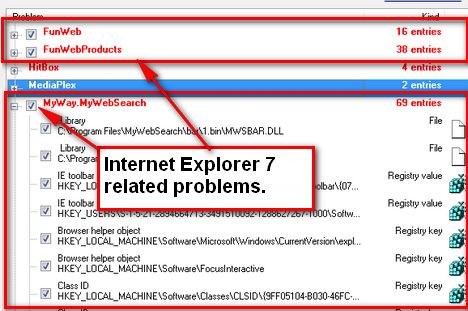
And the only thing we did was to install some Add-Ons from the official Windows Marketplace page. We did not navigate to any malicious web pages.
Conclusion
After we have tested around 30 randomly chosen Add-Ons we are wondering if someone from Microsoft is actually working on the Add-Ons for Internet Explorer page. How is it possible to have so many malfunctioning Add-Ons? How can you post Add-Ons that promise to offer an English Dictionary but install suspect products such as the MyWebSearch Toolbar instead?
Does anyone scan these Add-Ons for viruses or spyware? Do they even test the Add-Ons?
We think NOT. If Microsoft wants to convince users to use Windows Vista and Internet Explorer 7 they should wake up and learn from their competition. Firefox and Opera have been the better browsers for quite some time and if the current state of things continues, Microsoft might not catch up too soon.
Related articles:
Internet Explorer 7
How to solve common AutoComplete problems in IE7
Internet Explorer 8 - What's In For The Normal User?
Top Add-ons for Internet Explorer 8
Firefox 3: short review on Windows Vista
Must Have Firefox Extensions for Beginners

This work is licensed under a Creative Commons Attribution-Noncommercial 3.0 License.
Microsoft, Windows and the Windows logo are either registered trademarks or trademarks of Microsoft Corporation in the United States and/or other countries. Microsoft Corporation in no way endorses or is affiliated with www.vista4beginners.com.
All other products mentioned are registered trademarks and/or trademarks of their respective companies.
Comments
IE7
This is my first Vista PC !! This also is my first experience in using IE7 !! What a discouraging article on Internet Explorer 7 !! So sorry to find out that it could possibly be such a miserable experience with add-ons ! Sob, sob !!
Firefox
You can always try Firefox. The Add-Ons (Extensions) Firefox has are much better compared to Internet Explorer 7.
VistaSucks
I purchased Vista Ultimate a couple of days after it came out in March. Nothing but problems ever since. Compatibility problems with both legacy and new software applications. Hardware compatibility problems. Stability is questionable. It's just an all around terrible operating system. I have since uninstalled Vista and returned to Windows XP. Vista Sucks. In light of how bad this operating system is, windows has no inclination of fixing this, their response is to rush out a new version of windows (Windows 7). What they don't understand is that is what got them in trouble in the first place, rushing out Windows Vista.
IE7
IE7 is way too slow! It takes ages to open and close tabs in it! Use firefox!
Flock all the way. Get
Flock all the way. Get involved
Firefox, Flock, IE7
Flock is really only useful if you blog a lot (and if you do, it IS awesome, basically a reskinned Firefox with great blogging utilities added).
Firefox is by far and away my preferred browser. If you take a little time to learn about some extensions that suit you it will amaze! Even out of the box the spell checking in form fields and better control over cookies makes it a better choice. If you're not on a high-speed line AdBlock and FlashBlock will make things far speedier for you (and you can still play Flash videos, IF you want).
That said, if you work in a corporate environment you will find that a lot of web applications are built only for IE and won't work in Firefox. So install both and use IE 7 when there's no other choice. Also, IE 7 is still a giant improvement over IE 6.
There's some basic typos in this post. "way to little." and "names are not every inspired." I'm not usually the type to point out typos but I agree with your article and think professional proof reading will add credence to your claims. Thanks!
Typos
Thanks for pointing out the typos. We checked the article two times before publishing but it seems that we weren't good enough.
Displaying pages in Firefox, that are for Internet Explorer
There's a nice addon called IE Tab. https://addons.mozilla.org/en-US/firefox/addon/1419
Typos
"There's some basic typos in this post."
Don't you mean "There are some basic typos..."? :p
IE7Pro
Found this add on the other day, makes IE behave more like firefox with firefox style searching, ADblocking and Greasemoneky style userscripts. It also adds spell checking support.
Post new comment