
Configure Windows Live Mail to connect to Windows Live Hotmail and MSN Mail
Sat, 01/12/2008 - 20:33 — Alexandru Toma
 If you will try to configure Windows Mail to retrieve your e-mail messages from services such as Windows Live Hotmail or MSN Mail, you will always receive the following error message: 'Windows Mail no longer supports the HTTP servers used by Hotmail and other web-based e-mail providers'. That's because, for reasons known only by Microsoft, HTTP forwarding is no longer supported in Windows Mail. You can retrieve your e-mail messages only if you use their newest e-mail client called Windows Live Mail.
In our future articles we will talk more about this new e-mail client. For now, I will show you how to configure it to connect to Windows Live Hotmail and MSN Mail, and access your e-mail from your computer.
First, download and install Windows Live Mail. Then launch it and look for the 'Add an e-mail account' button.

Now complete the following fields with your personal information as shown below.

After you have filled all your personal information, click on Next. In the next window check the box that says 'Set this account as the default mail account'.
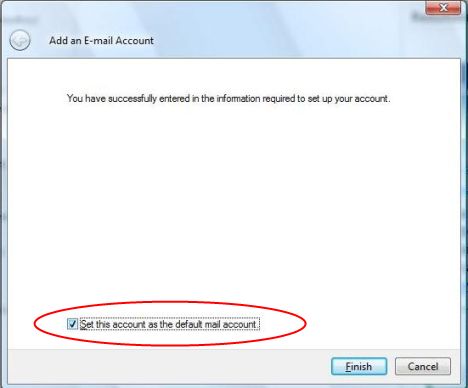
Congratulations! This is all there is to it.Now Windows Live Mail will automatically download all your e-mail messages.
Related articles:
Windows Live Mail - A short overview

This work is licensed under a Creative Commons Attribution-Noncommercial 3.0 License.
Microsoft, Windows and the Windows logo are either registered trademarks or trademarks of Microsoft Corporation in the United States and/or other countries. Microsoft Corporation in no way endorses or is affiliated with www.vista4beginners.com.
All other products mentioned are registered trademarks and/or trademarks of their respective companies.
Comments
Windows Live mail and Family Safety
I use windows live mail for all users on PC but cannot access hotmail through windows live mail with windows live family safety applied. Even with allow hotmail accounts tick box applied on her user settings. Any ideas on how to overcome this.
How To configur Mail service!
Hi, i have an account in live mail but i want to receive my all mail in windows live mail witch i like outlook but the problem is that i maked new account in windows live mail but it's want Incoming Server and out going server what i wrote there to connect with live mail service plz repaly me thank you....
Great Software
This is a great software! Thanks for showing it to us. I tried it out and it perfectly integrated with my hotmail account. Another wonderful aspect is that it automatically imported my Gmail account on my Windows Mail. Now whenever i open Windows Live Mail, I can send/receive mail from both my accounts without manually switching between them in my web browser! Convenient!
Gmail & windows live mail
my recent purchase of a new PC came with Windows Mail. I have tried everything, used all tips etc. to try and get my gmail account forwarded automatically without success. Will I have better luck with LiveMail ? Anyone with similar problem?
Gmail and windows mail
Have you read the tutorial from our website: Configure Windows Mail to connect to GMail?
Thanks
After manually downloading live installer from another pc and transfering it, finally got it working, great tips, hotmail and normal mail working from one menu, just like outlook express from my old machine, the way it should be.
Many Thanks
Sheppy
Live Mail
How absolutely wonderful.......I love it so far......
Web Page Not Found for Live Mail AND Hotmail!
Ever since I tried to configure Windows Live Mail I can not get to my mail accounts at all. I receive a Bad Request message that says Web Page Not Found whether I type hotmail.com, or LiveMail. I receive this error even when I click on the downlad Windows Live Mail configuration link from this very help screen. Ugh...so frustrating...what did I do and how can I fix it?
I get the same problem, plus
I get the same problem, plus my computer crashed when I load up live mail.
Windows Live Mail downloading ALL my old e-mails, unnecessarily
I just got Windows Live Mail with an upgrade to MSN messenger... It looks good.
But what I can't understand is why it is downloading all my old e-mails in my hotmail account - there are thousands of them, and I really don't need them on my PC... I thought the world was moving towards internet-only applications. So, this seems like a backward step to me As nice as Windows Live Mail looks (and it is nicer than hotmail), I can't see the value in having every e-mail I ever sent or received through Hotmail sitting on my PC...
Is this not an option I can switch off?
Also, does anyone know where Microsoft stores all those e-mails on my PC, so I can delete them?
Hoping someone has some advice!
Many thanks!
Post new comment