
Configure Windows Mail to connect to Yahoo Mail Plus
Wed, 11/14/2007 - 08:17 — Ciprian
 We have received a lot of e-mails from people asking how to configure Windows Mail to connect to their e-mail accounts from Yahoo Mail. In this tutorial we will guide you step-by-step on how to connect to the popular Yahoo Mail Plus service. Before we continue, please note that the free Yahoo Mail service does not support POP3, and you will have to subscribe to a Yahoo Mail Plus account in order to use this feature.
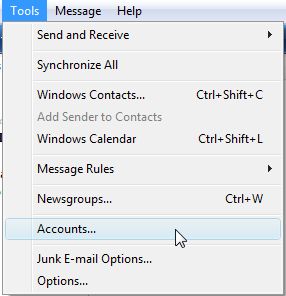
Start Windows Mail and then go to Tools -> Accounts.
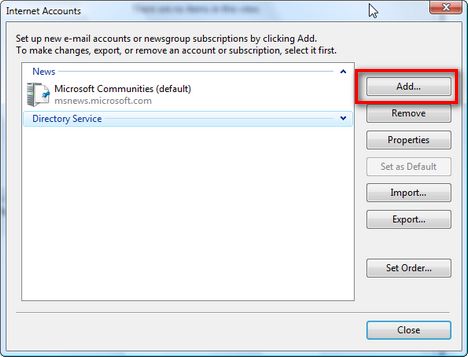
Click on Add to add the e-mail account.
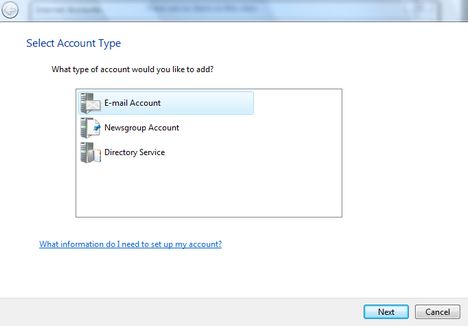
Select E-mail Account and press on Next.
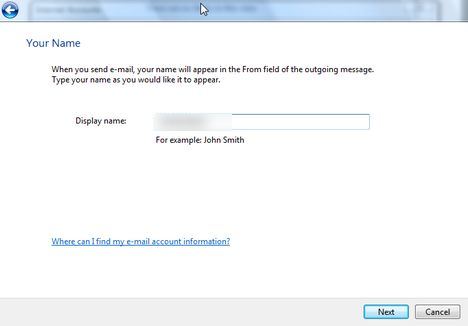
Type your name and click on Next.
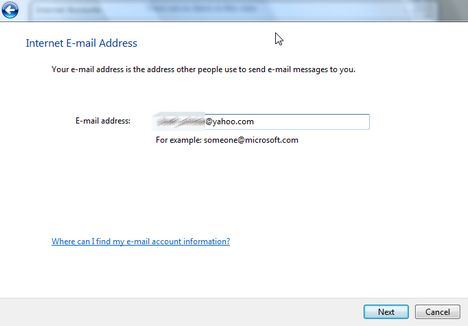
Type your e-mail address and click on Next.
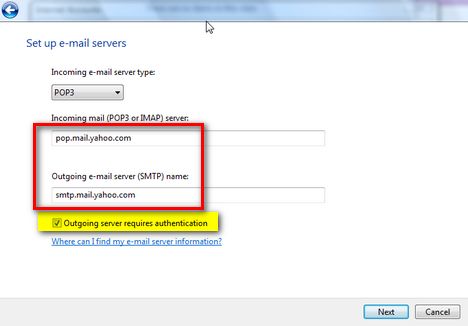
Choose POP3 in the incoming e-mail server drop-down list. Type „pop.mail.yahoo.com” in the incoming mail field and then „smtp.mail.yahoo.com” in the outgoing mail field. Also, don’t forget to check the „Outgoing server requires authentication” option. Then click on Next.
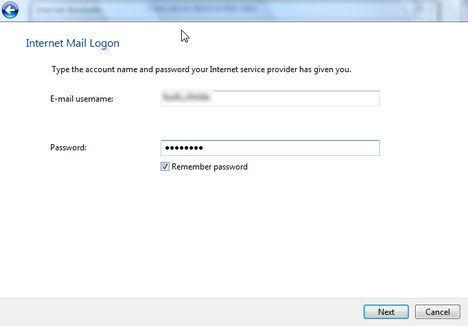
Type your username without „@yahoo.com” and your password. Check the „Remember password” option and click on Next.
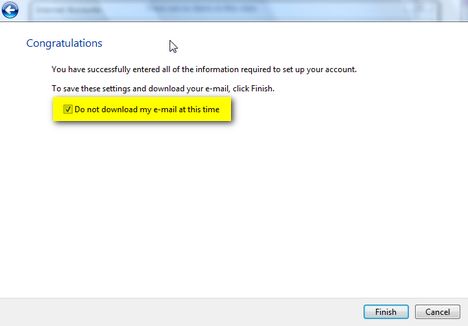
Check the „Do not download my e-mail” option and click on Finish.
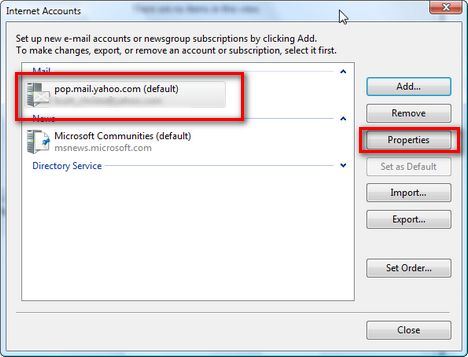
Now, select your e-mail account again and click on Properties.
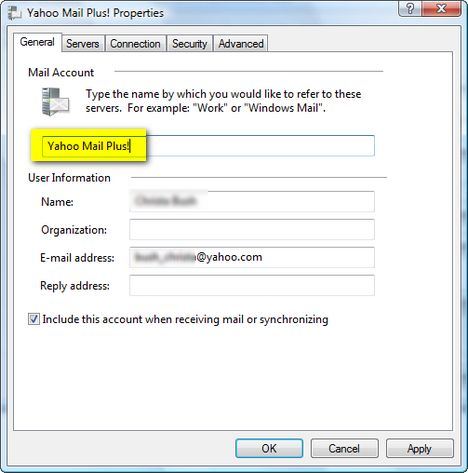
Go to the „General” tab and type „Yahoo Mail Plus” in your account name field.
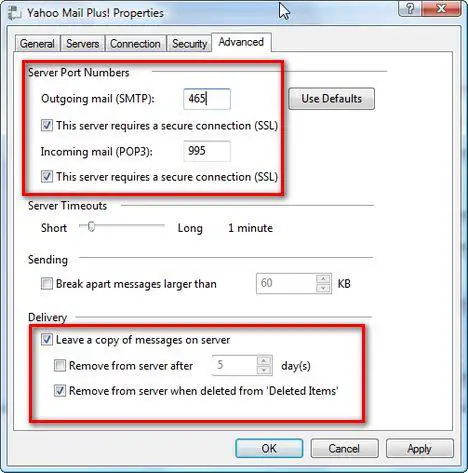
Go to the „Advanced” tab and check the „SSL” options for SMTP and POP3. Also type the ports 465 and 995.
Another recommended setting would be to check the „Leave a copy of messages on server” and the „Remove from server when deleted from Deleted Items”. Then click on OK.
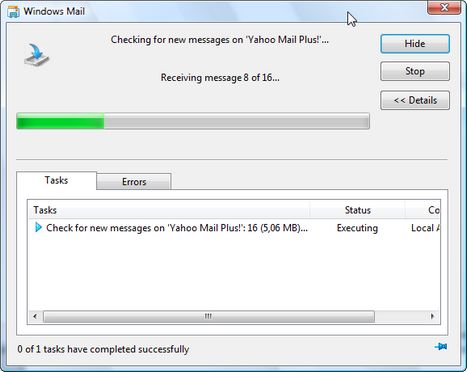
Now it should work. Press on the Send/Receive button and you should start receiving your e-mail messages.
This completes our Configure Windows Mail to connect to Yahoo Mail Plus! tutorial. Stay tuned as we will work on more of them with different mail providers such as Hotmail or Gmail.
NOTE: this guide works ONLY for Yahoo Mail Plus clients. The free service of Yahoo Mail does not offer POP3 access, therefore you will always receive error messages when you will try to connect via Windows Mail or any other e-mail client. If you are a Yahoo Mail Plus client and you still have problems connecting, than please use the Yahoo Help page. Unfortunately we cannot offer any technical support for Yahoo accounts.
Related articles:
Windows Mail
Configure Windows Mail to connect to Gmail
Where are the e-mail identities?

This work is licensed under a Creative Commons Attribution-Noncommercial 3.0 License.
Microsoft, Windows and the Windows logo are either registered trademarks or trademarks of Microsoft Corporation in the United States and/or other countries. Microsoft Corporation in no way endorses or is affiliated with www.vista4beginners.com.
All other products mentioned are registered trademarks and/or trademarks of their respective companies.
Comments
connecting to Windows mail
I have followed the instructions for adding my e-mail to windows mail and i am unable to connect this account, my account is yahoo.co.uk does this make a difference. I think it is trying to connect as i get a windows verification box which when i enter the information pops up again. help please!!
Yahoo Mail Plus
Are you a client of the Yahoo Mail Plus service?
yahoo acoount
i dont have yahoo pluss but i got yahoo small busisnes account how i can configure the new windows mail of windows vista?
Thankyou!
WOW! Thankyou so much! This really helped because I was always searching for POP access for both of these (Yahoo & Gmail) Websites!
Thanks dude !!!
Well Am really glad to have u genious online .... Thanks once again !!!
Connecting Windows mail (Vista) to Yahoo mail
Have followed the instructions which work until the Send/Receive demands entry of user name and password repeatedly (the windows verification box). I do not believe that I am a Yahoo Mail Plus client. Do I have to be?
Unfortunately you do have to
Unfortunately you do have to be a subscriber of Yahoo Mail Plus in order for this to work correctly.
re:Connecting Windows mail (Vista) to Yahoo mail
no matter how many times you try this it won't work. windows mail still has too many glitches. So, i guess it's to bad for all of us yahoo users.
configure yahoo small business mail to windows mail
how do I tell if I have mail plus or small business mail with yahoo? I pay 19.99 per year for the mail type I have with yahoo. I have followed instructions for windows vista mail but repeatedly get the i.d. verification box pop up.
connecting windows mail to mail server
Hi,
I was connecting windows mail to mail server by following your instructions but at the end when I click on "send and receive " link then windows asking my username and password repeatedly,so please tell me what should I do,how should I connect it,is this asking for my windows user name and password or my yahoo email's user name password.thanks