
Windows Memory Diagnostics Tool
Fri, 03/16/2007 - 09:23 — Ciprian
 Windows Memory Diagnostics Tool is a very useful troubleshooting application included in the Windows Vista operating system. There are times when your computer might start to fail and freeze or reboot on its own. This tool can help you to detect if these problems are caused by memory errors or not. It tests the Random Access Memory (RAM) on your computer and reports the errors that are found.
In this guide we will show you how to use this tool for troubleshooting memory problems.
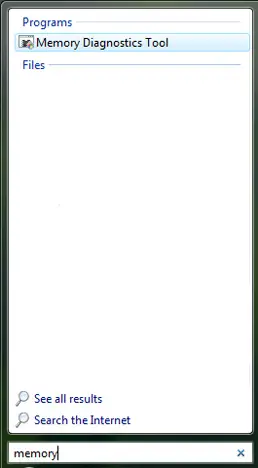
Windows Memory Diagnostics Tool can be found by typing the word "memory" or "MdSched.exe" in the Start Menu search field.
Also, the mdsched.exe file can be found in the C:\Windows\System32 folder.
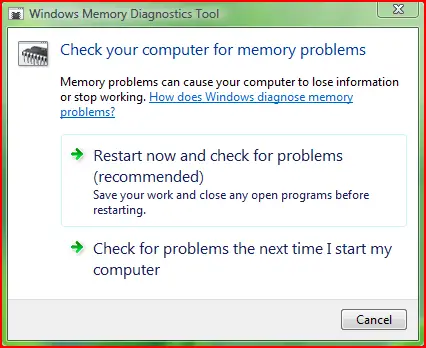
When the program starts you have two options: Restart now and check for problems or Check for problems the next time I start my computer. Choose the option you prefer.
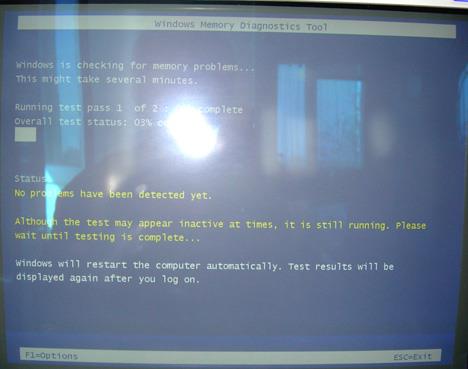
When the computer is restarted the Windows Memory Diagnostics Tool starts automatically. While the tool runs, you will see a progress bar indicating the status of the test.
Windows Memory Diagnostics Tool offers some configuration options. To access them, press F1 and the following screen will be loaded.
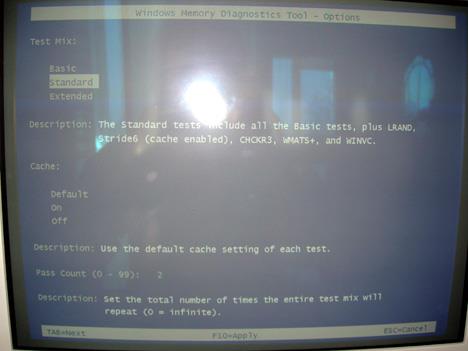
Here you can adjust the following settings:
- Test mix - Choose what type of test you want to run: basic, standard or extended.
- Cache - Choose the cache setting you want for each test.
- Pass count - Type the number of times you want to repeat the tests.
To apply the selected configuration options, press the F10 key and Windows Memory Diagnostics Tool will make the memory test according to your options.
Once the test is done, Windows Vista will restart automatically.
If the Memory Diagnostics Tool does not find any errors, you'll get a message that no errors were found. If the Memory Diagnostics Tool detects problems with your computer's memory, contact your computer or memory manufacturer for information about fixing the problem.
Related articles:
Check your system health with the Reliability and Performance Monitor
Check your System Stability Index
Solve your computing problems with Problem Reports and Solutions
Troubleshoot Driver Problems Using DPC Latency Checker

This work is licensed under a Creative Commons Attribution-Noncommercial 3.0 License.
Microsoft, Windows and the Windows logo are either registered trademarks or trademarks of Microsoft Corporation in the United States and/or other countries. Microsoft Corporation in no way endorses or is affiliated with www.vista4beginners.com.
All other products mentioned are registered trademarks and/or trademarks of their respective companies.
Comments
does anyone knows how to trun off the memory program?
I ran the windows memory diagnostics tool program but did NOT get any feedback.
now the program is still running on my task bar.
does anyone knows how to trun off the memory program??????
A problem with RAM
Maybe you can help me... After runnig a MDT on extended settings with two passes, progress stops on 10% and won't go (waited 3 hours), but test doesn't freezes (I can exit or change settings).
I have 4 GB OCZ DDR-3 with raised voltage to 1.84 V.
DITTO..........
mine does the same thing at 10 percent i have 8 gigs ocz sli ready ram.
I have 3x2GB (6GB) of OCZ
I have 3x2GB (6GB) of OCZ gold RAM (and have been having really bad stability issues with Windows 7). I ran the extended test and it too hangs at 10% but after a couple of hours it continued and then stuck again at 80% and at 90% but did complete. I have read that WMT only checks the first 4GB RAM, so I removed 1 bank and ran the tests again. My extended test failed twice in a row, so I'll be looking to contact overclockers agin.
Every time I try to run the
Every time I try to run the memory tool I get the error "A problem is preventing Windows from checking for memory problems during startup Try to check for problems again by running the tool manually"
Whats the deal and how do I run it manually? Ive never used it before
memory diagnostic tool - vista shut down during diagnostic
during memory diagnostic tool, vista shut down after 50% 1st time, 2nd time 38% and 3rd time after 30% of diagnostic. Reason for doing diagnostic is my vista when started it displays "Muicrosoft ONECARE STOPPED WORKING then it locks all the program. Not be able to start any other program, including system restore and it just locks everything. then done sytem restore from safe mode, now window goes blank after windows logo then "WELCOME", only thing I can do is CTRL+ALT+DEL to show task manager nothing else.
a problem with memory diagnostic tool
i have a problem with my memory tool...
everytime i turn my computer on it does the test and runs on continuously SOMEBODY HELP PLEASE!
Memory Test
The moral is, because a web site says do something does not mean it's a good idea. Check lots of sites first and always read what others have said before you do a thing.
I think running Memory diagnostics slowed my computer down
I tried running a memory diagnostic, no reason to, and it slowed my computer down considerably, so if you can help me on that would be awesome
David
Windows Memory Diagnostic Paralysis
I followed the instructions to run the Windows Memory Diagnostic tool on my HP desktop at next startup. I have done the next startup, and the monitor is black. No screen ever came up, and my computer is totally unresponsive after an hour. Ctrl+Alt+Del does nothing either. I ran the test because over the last several months my computer has become painfully slow. Most of the time it seems that it has something better to do and ignores me, greying out the application I am trying to work on and ignoring me for minutes at a time in favor of whatever it wants to do. Something must be wrong, but it has never done anything like this. help?
Post new comment