
Windows Contacts
Thu, 04/26/2007 - 10:20 — Ciprian
 Windows Contacts is a new application distributed with Windows Vista, that replaces the old Windows Address Book. This application has all the features of its predecessor and some new ones such as the ability to add pictures to your contacts, a new XML based file format for storing contacts and better extensibility for integration with other applications.
As you can imagine, Windows Contacts integrates with Windows Mail. When you create an e‑mail message in Windows Mail, you select the recipient from your Contacts folder. Even if you do not use Windows Mail as your default e‑mail client, you can still use Windows Contacts to store all the contact information about the people you know.
The Windows Contacts shortcut can be found directly in Start Menu -> All Programs. When the application is launched, it loads all the existing contacts.
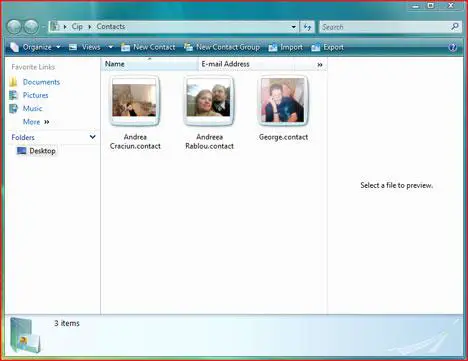
Windows Contacts offers a pretty limited functionality. All you can do is create or delete contacts, create contact groups and import or export your contact list.
To create a new contact, press the New Contact button. A new window will appear where you will be able to enter the information you have about your new contact. You can enter plenty of information which is split into several categories: name and e-mail, home, work, family, notes and IDs.
You can also add a picture of your contact. To do that, click on the small arrow that can be found below the picture icon from the right side of the window. A small menu containing two options will appear. From this menu, select the Change picture option and then browse to the location of the contact's picture.
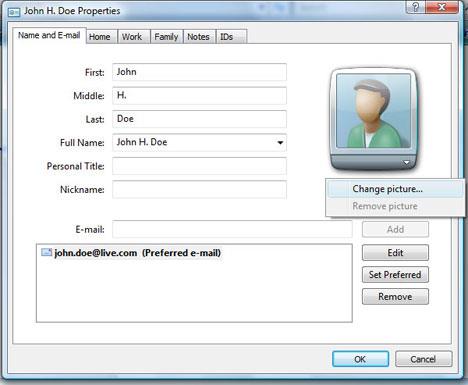
After you have finished completing all the information press the OK button and the new contact will be added to your contact list.
NOTE: If you cannot find the New Contact button, then right click and select New -> Contact.
Related articles:
Missing buttons from the Windows Contacts toolbar?
Windows Mail
How to create e-mail contact groups in Windows Vista
The complete guide to the Windows Calendar - Part 1

This work is licensed under a Creative Commons Attribution-Noncommercial 3.0 License.
Microsoft, Windows and the Windows logo are either registered trademarks or trademarks of Microsoft Corporation in the United States and/or other countries. Microsoft Corporation in no way endorses or is affiliated with www.vista4beginners.com.
All other products mentioned are registered trademarks and/or trademarks of their respective companies.
Comments
Using Birthdays from Contacts to populate Calendar
I was wondering if it was possible to some how populate Windows Calendar with the birthday and anniversary information that is contained in Windows Contacts? If not, is this something that is on the horizon? And if not, in the interim, what would be a good add-on calendar program that could seamlessly handle this requirement? Thanks.
Yes, I would like to see
Yes, I would like to see this capability as well, importing dates from the contacts into Windows Vista Calendar.
windows mail group
I created a large email group of 0v 2000 contacts in one group to find out that it is to large to send, how do I move the contacts from this group to open new groups of 100 contacts each that I could email.
windows contacts defaults
how do you set defaults fo rwindows contacts in Vista? i want all names stored as lastname,firstname.
murray
Contact sorting
When you're in the contacts window, right-click on the bar over the contacts, the one that has 'Name, E-Mail Address, Business Phone...' on it. You'll see a list appear with check boxes next to it, that list is showing what fields are displayed on your list. Check the 'Last Name' option and you'll see that field appear on the bar. (If you don't see it, stretch the window out wider until you do.) Click on the Last Name field to re-sort your contacts by their last names. If you want to see a list with Last Name, First Name, repeat the above process and add the First Name field. Change the views option to Details, then click and drag Last Name and First Name to the left side of the bar.
Contact Sorting
How do you 'change the views option to Detail and then click and drag last name and first name to the left side of the bar'?
Contact sorting
Thanks. This does seem to control sorting in the Contacts window, but unfortunately it does not affect sorting in the "Select Recipients" window of Windows Mail. That is what I am looking for (like in OE), and I assume that is what most people want. Any ideas?
Windows Mail
Open windows>file>new>contact>add info
Tools>windows contacts>click on contact to edit
windows contacts defaults
In Windows Contacts under the Tab Name and E-mail there is a box that fills up automatically as you enter First (name), Last (name), etc. Click on the drop-down arrow associated with that box. You will then be able to select lastname, firstname for that Contact.
Is there a way to do this
Is there a way to do this automatically for all contacts?
Post new comment