
Getting to know the Microsoft enthusiasts: Corrine Chorney - Microsoft MVP
Mon, 06/25/2007 - 09:01 — Ciprian
 Windows Vista for beginners is a small fish in the Windows websites pound. We know nobody else and it seems that not too many people know us. A while ago we decided to change this. So, we slowly started to get to know the people that run some of the sites forming the Microsoft Windows online community. We also want our readers to know them so we thought that creating a series of interviews with them would be a good idea.
Our first guest in the series of interviews to come is Corrine Chorney - one of the Microsoft Most Valuable Professionals in Windows Security. She is a member of several security forums and a very active blogger. Compared to other Microsoft MVPs she is not very famous. That’s because she is a modest person who values helping others more than personal fame.
What was the first time you came across computers?
I have worked in an office environment for many years (read decades). When I started, we would fill out data entry sheets for keypunching. Now all of that data is stored on an SQL Server and I am fortunate to be the person providing software support to the staff.
What are your first memories of Windows?
Oh my, that would be Windows 3.1 and Windows for Workgroups. In fact, I was against moving to Windows. We were maintaining two Wang CPUs in our office, which was a major step up from the IBM "MagCard". At the time, it seemed that we already had the perfect solution. Now, well, how times have changed. We have long left behind carbon paper, cut and paste is no longer done with scissors and glue.
What about Windows Vista? When did you use it for the first time and what was your impression?
I guess you could call me a newbie user since I did not experience Windows Vista until this past May. Last autumn, I participated in a BlogRocker contest sponsored by the MVP Program. The concept of the contest was to award points for community activities, not exclusively blog posts. Between forum help and blog posts, I garnered enough points to take second place in the contest. Since my XP machine was getting rather old, I waited for the prize delivery to experience Windows Vista.
The prize finally arrived in May. Since my home computer has always been an OEM build from a local PC shop, I decided to jump in feet first with my prized laptop and installed Windows Vista Ultimate. I was impressed from the start. Installation was a breeze -- easier than some software programs I've installed in the past. Microsoft has definitely perfected the process.
First impression? It just seemed intuitive. I really like the changed layout; the Control Panel, for example. After using Windows Vista for a few weeks, I changed the Control Panel to the Classic View. I quickly changed it back to the new Control Panel "Home Page". What I like about it is that related functions are grouped together – intuitive.
Another feature of Windows Vista that I like is the enhanced Security Center. I really like the interface, particularly being able to check Installed Updates (located at Control Panel\Programs\Programs and Features\Installed Updates).
When and why did you become a Microsoft MVP?
It isn’t a matter of "becoming" a Microsoft MVP (Most Valuable Professional). I was nominated by another Windows Security MVP and subsequently contacted by the Windows Security "Lead" for information regarding my community activities. You see, the MVP award is based on community activities that occur during the previous year.
MVP Award:
"In order to receive the Microsoft MVP Award, MVP nominees undergo a rigorous review process. Technical community members, current MVPs, and Microsoft personnel may nominate candidates. A panel that includes MVP team members and product group teams evaluate each nominee's technical expertise and voluntary community contributions for the past year. The panel considers the quality, quantity, and level of impact of the MVP nominee's contributions. Active MVPs receive the same level of scrutiny as other candidates each year."
I was first awarded Microsoft MVP, Windows Security in January, 2006. I was re-awarded this year. The primary help that I provide is at various security forums.
What is it like to be a Microsoft MVP?
It is absolutely thrilling to have received this award. When I consider that there are only about 3,500 MVPs worldwide, divided among over 90 technologies and then realize that there are considerably less than 200 Windows Security MVPs, I am dumbstruck. Here I am, an ordinary person, recognized by a huge corporation because I like to help people.
What are the perks and responsibilities?
There are no responsibilities associated with the award, although there are a few perks, including the opportunity to interact with Microsoft product groups and an award of software and similar benefits. The award is really a thank you from Microsoft, a form of recognition for our contributions.
The difference between Microsoft and other companies is that recognition is given not just to people who provide help with Microsoft-specific software (i.e., Microsoft Office software, Microsoft Servers, Windows Live, etc.). For example, as a Windows Security MVP, I help people "clean" their computer of malware infections. I recommend the software suited for the infection, primarily using free software developed by other members of the "security community". Some of the developers of that software are MVPs and others are not. These are the people who are truly amazing.
Do you enjoy being a Microsoft MVP?
Absolutely! I consider it an honor to have been recognized by Microsoft for the help I provide. To be recognized in this way for doing what I enjoy -- helping other people -- is very special.
As a Microsoft Windows Security MVP, what is your opinion about the security changes in Windows Vista? Did Microsoft manage to create a truly safe operating system?
No operating system is 100% safe. With Windows Vista, the computer owner can always turn off UAC (User Account Control) or can allow an unsavory application to be installed. No software vendor can prevent that from happening. Protected Mode can be turned off in IE7, as can the Phishing Filter. The user may not take the time to scan downloaded software or create a System Restore point before installing software that could be infected. Automatic Updates can be disabled, the firewall turned off, no anti-virus software installed or updated, or the trial expired.
That said, Microsoft has provided the tools in Windows Vista for a secure system. We complained about the user accounts and Microsoft created UAC. We complained about the Windows Firewall introduced with Windows XP SP2, and Microsoft made it a two-way firewall for Windows Vista, providing the option of blocking outbound traffic and to create firewall "rules". Data Execution Prevention can help protect the computer by making it harder for hackers to silently execute their programs. Windows Defender is included with Windows Vista, providing an available anti-malware application with real-time protection.
With Parental Controls, among other options, parents have the ability to configure restrictions for their children on the time periods computer access is permitted. They can create a custom Web allow/block list and, based on the child’s age or maturity, configure what games the child is allowed to play. Different configurations can be created for each child’s user account.
Before you ask, I like UAC. I have always wanted to know what is going on with my computer and have no problem with the occasional UAC prompt. UAC aids in allowing me to stay in control.
Would you recommend your friends to buy Windows Vista?
Unless they have a relatively new computer with sufficient RAM and a decent video card, I would suggest waiting until they ready for a new machine. On the other hand, if they are planning on upgrading an existing computer, I would encourage them to use the Windows System Assessment Tool as well as checking that Vista drivers are available for their existing software and hardware. Then I would absolutely encourage them to go for Windows Vista. It is not merely the additional security features available in Windows Vista but also the versatility of the operating system. Consider Windows Shadow Copy, the Snipping Tool, Search, Windows Flip 3D. It is a fun operating system and I am fully enjoying the available amenities.
I know that you have a pretty active blog. When did you start blogging and why?
A fellow MVP and my friend and mentor had been encouraging me to start a blog. I had thought about it for a while but knew if I started a blog, I wanted it to be different. I did not want to merely regurgitate information found elsewhere. Yet, I also didn’t want a blog to become a chore.
The inspiration for Security Garden actually came about in a rather strange way. It began one Saturday at the local public library. An attorney who had retired from our office was in town on business. She happened to stop at the library to use the public telephone. While chatting, she asked me about my garden. Later that evening, when I was thinking about that conversation, it occurred to me to combine the two – computer security and gardening. Thus, Security Garden was born.
The target audience for Security Garden is consumers – the home computer user. That is also why I created Windows Vista Bookmarks. As a home computer user looking toward the move to Windows Vista, I wanted to keep track of good information that I felt would be helpful setting up and using the new operating system. As I started adding bookmarks to my collection, I realized that others could also benefit from the same information. The intent is to "keep it simple", yet provide links to both helpful as well as safe information for my readers. This is how I located Vista4Beginners.com. Recognizing the quality information for the very people I help, I was quick to update my RSS Feed, add to Windows Vista Bookmarks and write about your tutorials in my blog.
Nice story. The fact that you always sign your posts with a red rose has anything to do with it?
Actually, the connection to roses is another story all together. I believe it was around August of 2000 when the phpBB software was upgraded and avatars were added to member options at Freedomlist (FL). I was searching high and low for just the right avatar and wasn’t happy with anything I found. A fellow Admin at FL found and sized the rose avatar for me. Thus, it truly is a "gif from a friend."
As I started expanding my horizons and joined other forums, of course I used the rose avatar. On several occasions, people told me that they recognized me by the rose as the same Corrine from Freedomlist when I joined the site. I was often greeted as "the rose lady."
 When I began Security Garden, I spent a lot of time – too much time actually – locating garden-themed images that coordinated with the story I was reporting. After a while, it seemed that I was spending more time searching for images than posting. With the "rose lady" connection, I finally settled on the one single rose as a form of a signature to my blog posts.
What do you do every day, except blogging?
Professionally, I am a long-time employee in the Legal Department at Eastman Kodak Company as a Systems Analyst. In that capacity, I provide systems support for specialized applications. I am also webmaster of the Legal Department intranet site and design and maintain Lotus Notes databases for the Legal Staff.
As I mentioned, my primary focus is providing help in on-line security forums. It is through those communities that I have made very special friends from all over the world. We work together behind the scenes providing guidance and support to one another. It is an interesting concept, this "chosen family", and it has proven time and again to work well.
What are your goals in the short term?
I am finishing up a remodel of Security Garden. It is time to upgrade to "New Blogger". I am adding a third column to help clean up some of the "clutter" and have edited the standard template to add my personal touch to it. Although it may change a bit over time, the one thing that will remain is the Security Garden logo, which was created by my friend and mentor.
There is something new to learn every day. Technology changes, computer users are faced with new threats. I hope to continue providing help as I can, where I can. Interestingly, while I may be "working" with one person in a thread on a forum, there will be hundreds of "views" of the information I provide. When I blog about a particular topic or software, the words I choose, the tag I select, the issue being discussed will turn up in a search engine. By carefully framing instructions as clear and complete as possible, by providing some bit of helpful information, someone else may benefit from that information. Beyond the number of views and blog analytics, this belief that I have always held was illustrated by Sean O’Driscoll, Microsoft General Manager, Customer Service and Support Community and MVP, in his blog post where he wrote:
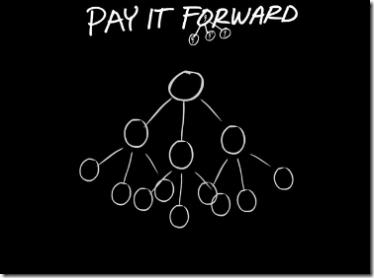
"3 people helped each day, "paid forward" by each person helps 4.7M people in two weeks."
That is both my short-term and long-term goal, to "Pay It Forward".
Thank you!
We would like to thank Corrine. Even though she recently lost a dear friend she still managed to create some time to answer our questions. You have our sincere condolences.
Related articles:
Getting to know the Microsoft enthusiasts: Joseph Fieber - ITsVISTA.com
Getting to know the Microsoft enthusiasts: the How-To Geek
Getting to know the Microsoft enthusiasts: Anand Khanse - winvistaclub.com
Getting to know the Microsoft enthusiasts: Vishal Gupta
Getting to know the Microsoft enthusiasts: James M. Fisher from Windows Talk

This work is licensed under a Creative Commons Attribution-Noncommercial 3.0 License.
Microsoft, Windows and the Windows logo are either registered trademarks or trademarks of Microsoft Corporation in the United States and/or other countries. Microsoft Corporation in no way endorses or is affiliated with www.vista4beginners.com.
All other products mentioned are registered trademarks and/or trademarks of their respective companies.
Comments
You're Welcome!
I must admit, answering your questions was one thing, but seeing the interview "in print" is quite another.
Thank you for the kind words. (((Blush)))
Corrine
Wow,I am reading this in
Wow,I am reading this in China.What a great topic!I hope to know more MVPs and learn from them.I will be waiting for more.
Congratulations
Congratulations, Corrine, and it is nice to see your beautiful face.
Lena
Thank you!
Thank you, Lena.
Wow is right- Nice article
Very Nice Article
Thank you for sharing
Regards,
JonPaul
You're welcome
Thank YOU, JonPaul.
Post new comment