
Sticky Notes
Tue, 03/20/2007 - 10:47 — Ciprian
 Sticky Notes is a very small and easy to use application that allows users to create short handwritten or voice notes. The notes are arranged in a stack on the desktop, similar to paper sticky notes.
It was first included in Windows XP Tablet PC Edition and it also made it to the Windows Vista Tablet PC list of components. To find it go to Start Menu -> All Programs -> Accessories -> Tablet PC.

The interface is very simple and easy to learn. To create a note, just start writing using your mouse or stylus.

If you want to record a voice note just press the record button and start talking. When finished press the stop button. To play the note you just recorded or any other voice note just click on the play button.

All the notes are automatically saved so you don't need to worry about it. If you want to create a new note, just press the New Note button.
You can configure Sticky Notes to run automatically at every system startup to have quick access to all your notes.
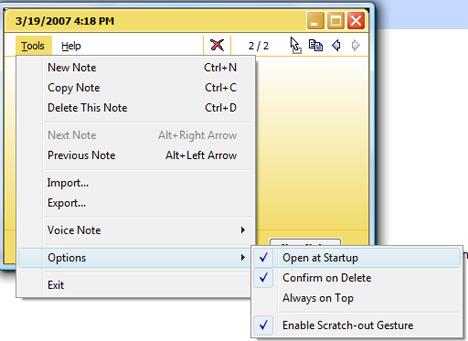
Just go to: Tools -> Options and check the Open at Startup option.
Related articles:
Windows Journal
Shock Sticker
Recommended articles:
Sticky Notes keyboard shortcuts.

This work is licensed under a Creative Commons Attribution-Noncommercial 3.0 License.
Microsoft, Windows and the Windows logo are either registered trademarks or trademarks of Microsoft Corporation in the United States and/or other countries. Microsoft Corporation in no way endorses or is affiliated with www.vista4beginners.com.
All other products mentioned are registered trademarks and/or trademarks of their respective companies.
Comments
Keyboard with sticky notes
Hi,
Can the keyboard be used with sticky note. Like using it on a normal laptop as against a tablet PC. if it cant, what similar program work like a sticky note and can.
Thanks alot
Kenniy
Evernote
Try Evernote.
Sticky Notes
How can i recover StickyNotes that were deleted? My recycle bin is empty. Thanks
Sticky notes and Vista
After one of my many vista up dates, my drag and drop feature no longer works.
Uhhhhhh....
Would be more useful if I would be able to actually TYPE my notes out?
wow.. who is the genius who thought of this idea??
hmm awesome tool.. now only if I had a tablet... :P
What a stupid idea to put this software without being able to use the keyboard! but what else can you expect with the current IQ level of Microsoft programmers these days?
First I thought it was a cool
First I thought it was a cool program, until I found out, that one can't use keyboard to type here.
Pretty stupid, if you ask me.
Boo to Sticky Notes
I was excited about sticky notes ...UNTIL i found that I CANNOT type in them. What gives? Why is this on my computer (VISTA) if I can't use it? My friend has Windows 7 and types in hers ..they are color coded and everything. I'm so disappointed :( I really needed that feature...sigh
Upgrading Sticky Note to the current version?
Anyone know how to upgrade the Vista Sticky Note tablet version to the current version ??
Post new comment