
Keep Your Applications Up-to-Date With Update Notifier
Sat, 05/30/2009 - 21:43 — George
 One of the things that I liked about Ubuntu (or any other Linux distribution) is the centralized software manager that you can use to search, download, install and update applications. The same software manager notifies you when there are updates available for any of the software installed on your system. I always wanted such a feature for Windows Vista. After a bit of research I found Update Notifier, a freeware application which does exactly what it says, it notifies you when there are updates available for the software that you have installed. In this article I will show you where you can find this tool and how to use it.
Where To Find & How To Install Update Notifier
You can download Update Notifier from its homepage at CleanSofts. After the download, run the updatenotifier.exe file, select if want to run the program from an USB stick or from your hard disk, choose the shortcuts that you want to have and click on the Finish button.
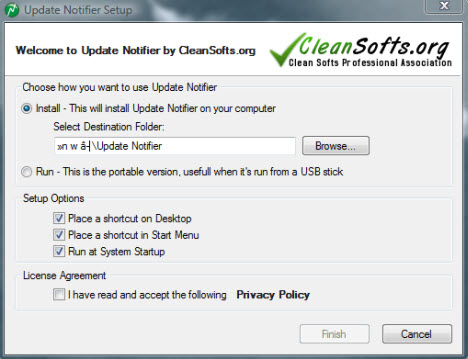
NOTE: When you use Update Notifier, an UAC prompt will show up. To have less prompts, you can either use Norton User Account Control or disable UAC only for this application.
How To Use Update Notifier
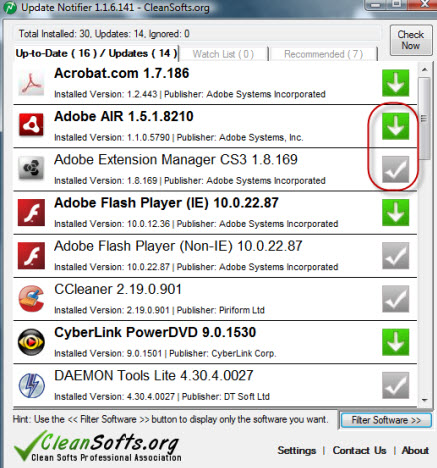
When you launch it, Update Notifier will search updates for your installed applications. As you can see in the screenshot below, the interface is very straight-forward.
You have a list with all the applications that Update Notifier found on your system. If an application has an update available you will see a green arrow right next to it. If an application doesn't have any updates a gray check mark will be displayed. If you want to download the update click on the green arrow icon and you will be redirected to the CleanSofts website where you can download the update.
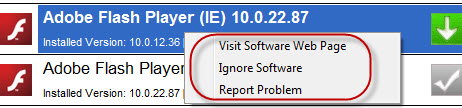
If you right-click on any application, you can visit the software webpage, ignore the software or report a problem.
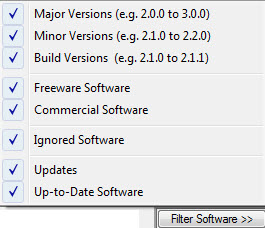
Another feature of Update Notifier worth mentioning is the possibility to filter what software to monitor.
Conclusion
While using Update Notifier I've enjoyed its simplicity, the possibility to run it from portable devices and it's very good software detection rate (from 38 installed application, Update Notifier detected 30). One of the very few things that can be improved in future versions, would be to add the ability to download updates directly from the application, without having to go back to the CleanSofts website.
If you know similar solutions which work just as well or even better, don't hesitate to share them with us.
Related articles:
Driver Scanner 2009 - Does it truly keep its promise?
How to work with the new Windows Update
How to uninstall Windows Vista updates
What software should I install on my PC?

This work is licensed under a Creative Commons Attribution-Noncommercial 3.0 License.
Microsoft, Windows and the Windows logo are either registered trademarks or trademarks of Microsoft Corporation in the United States and/or other countries. Microsoft Corporation in no way endorses or is affiliated with www.vista4beginners.com.
All other products mentioned are registered trademarks and/or trademarks of their respective companies.
Comments
Post new comment