
Driver Scanner 2009 - Does it truly keep its promise?
Thu, 11/20/2008 - 22:36 — Ciprian
 When choosing which tool to review next on our site, we stopped for Driver Scanner 2009, as it promises to address one major problem that people have with their computers: keeping your drivers up to date at any time with minimum effort. Keeping track of driver updates for all components that are included in your system is a time consuming task for everybody, mostly for beginners. Not too many people really know the custom details of their hardware devices, and thus installing the correct drivers for every component is a difficult task. Using a single software for finding, downloading and installing the necessary drivers and updates seems to be an excellent idea. Now let's see how this idea got implemented and whether Driver Scanner 2009 really delivers what computer users need.
Good things
There are quite a few things you might like about this tool at first sight: the installation process is very quick and easy to follow; the application does not install too many shortcuts and doesn't try to sell you additional tools like other software setup wizards do; the registration process is very quick and easy to follow once you have obtained the serial number.
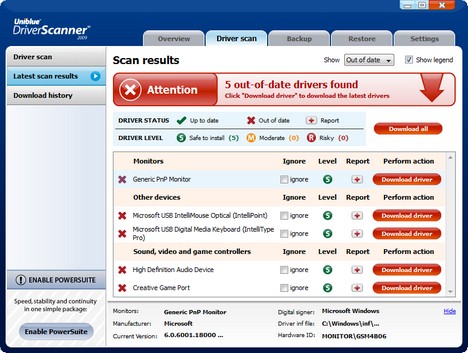
When first launched, Driver Scanner 2009 starts scanning your hardware components and checks which driver updates are available. As you will see for yourself, the interface is user friendly and you will have no trouble finding the options you need; downloading a driver update couldn't be easier.
Apart for the interface, another thing you might enjoy is the backup and restore feature. Even if this is not ground breaking and is common to many other similar applications, it works well and it's very useful. When having to reinstall your Operating System, you can easily backup all drivers to a USB stick, reinstall the OS & Driver Scanner 2009 and then restore all drivers with just a few clicks.
Things that could be improved
Even though the idea behind this tool is great, after testing it several times on two different computers, I believe that there are quite a few things that should be improved. I will start with the nice to haves and finish with the critical things:
- By default, when the application starts, it automatically scans for the list of drivers installed on your PC. Unfortunately you cannot cancel the first part of the process and you have to wait each time for it to finish. The only available alternative is to go to the Settings menu and disable the automatic scan process. I believe it is worth having the Cancel button enabled at all times during this process and I hope future versions will offer this improvement.
- Once Driver Scanner 2009 loads the list of available driver updates, it gives you the names of the devices which have updates but it does not tell you what those updates offer. There is no link you could try to see what is new in terms of driver fixes and features. If you want to see what a driver update offers, you need to search on the web by yourself.
- When downloading and installing driver updates, you have two choices: download all at once or download & install driver updates one by one. Unfortunately there is no checkbox to allow you to select the drivers you want to update and then click on some sort of 'Download selected' button. If there are many driver updates available and you do not want to install all of them, it can be time consuming to download and install only a few, one by one.
- One missing feature from Driver Scanner 2009 is the fact that this tool doesn't identify unknown devices. If you have a hardware component which is not appropriately detected by Windows Vista, this tool won't offer you any driver recommendations. You still need to identify the manufacturer and model of the component, find by yourself the appropriate driver and install it. Having such a feature would have been a great selling point for beginners which have a hard time trying to figure out what drivers they should install for their components.
- Another important issue I have identified is that Driver Scanner 2009 does not detect driver updates for some of the latest video card models. On the PCs I've tested this tool, I had an ATI Radeon 4850 & GeForce 9600GT video card installed. Both on the AMD(ATI) and Nvidia website there were driver updates available already 3 or 4 weeks before my testing of Driver Scanner 2009, but they were both undetected. Plus, these driver updates were not beta updates, to think they might have been skipped for this reason. They were both official releases of stable and tested drivers. Gamers are very interested about having the latest video card drivers installed so that the latest gaming titles work better. In my opinion, missing driver updates from the two major video cards producers is an issue that must be fixed as soon as possible.
- Again, another major problem I have encountered while using this tool is the fact that it can sometimes recommend you to install wrong drivers, resulting in problems and possible system instability. For example, on one of my PCs I have a Creative Audigy 2 ZS sound card. As you can see in the screenshot below, Driver Scanner 2009 detected that there is an update available for my 'Creative Game Port' and another one for my 'High Definition Audio Device'.

First, I downloaded and installed the recommended update for the 'Creative Game Port'. As you can see, Driver Scanner 2009 recommended me to install a beta driver for a Creative Sound Blaster X-Fi sound card.
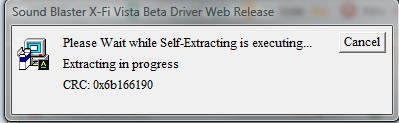
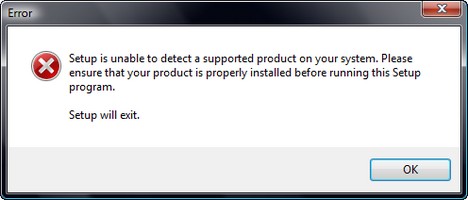
Of course, the driver installation process failed, as it was for a different sound card model than my own.
Next, I tried to install the update for the 'High Definition Audio Device'. As you can see, Driver Scanner 2009 recommended me to install a Realtek driver. However, I have no Realtek audio devices on my PC, only Creative. Installing drivers for a completely different device can actually crash your system in certain situations. This is by all means a totally wrong recommendation.
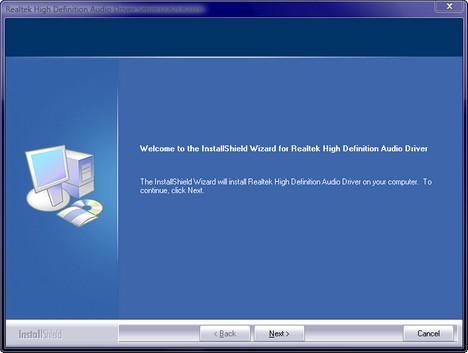
Personally, I fail to understand which were the basis for these two very wrong recommendations. Recommending users to install the wrong drivers can result in serious problems with their PC.
Conclusion
The concept for this tool is a great one and it tries to solve a problem that many people have. Even though Driver Scanner 2009 looks and feels like a great little tool, it fails to deliver its main promise: fast & reliable driver updates for your PC. If you are a power user with a bit of hardware & driver knowledge, you might want to consider giving it a try as it can help in certain scenarios. If you are a beginner, I believe that you should stay away, at least until an improved version of this tool is launched.
Recommended articles:
How to uninstall the driver of a hardware component
Keep Your Applications Up-to-Date With Update Notifier
Troubleshoot Driver Problems Using DPC Latency Checker
Download Windows Vista SP1 Drivers for Creative sound cards
Solve your computing problems with Problem Reports and Solutions
Check your System Stability Index
Check your system health with the Reliability and Performance Monitor

This work is licensed under a Creative Commons Attribution-Noncommercial 3.0 License.
Microsoft, Windows and the Windows logo are either registered trademarks or trademarks of Microsoft Corporation in the United States and/or other countries. Microsoft Corporation in no way endorses or is affiliated with www.vista4beginners.com.
All other products mentioned are registered trademarks and/or trademarks of their respective companies.
Comments
Drivescanner 2009
So far it's done the trick for me.
I had thought that Windows Vista was supposed to cover all that stuff, but apparently it failed to live up to Microsoft's intents.
Cannot install!
I have install RegistryBooster and SpeedUpMyPC, but first I have install Microsoft .NET Framework 3.5. All installation went fine and works great. But I have failed to install DriverScanner. I don't know what's wrong, installation process keep in progress but did not reach even 1%. It was like 'not responding' while installation in progress. Please help what's wrong with the installation.
Thank you.
gave me a totally different
gave me a totally different sound driver than the realtek one i had now its got via sound. The weird thing is its working and before my computer would get scratching sounds while playing games and that due to the soundcard being integrated. Now no more scratches and its weird since my computer comes with realtek prepacked on the hard drive with PC Angel. I reccomend the prog i been dealing with bad sound for 2 years nice to have it fixed
Driver Scanner vs. DriverMax
Can anyone comment on whether DriverMax is better than Driver Scanner?
Thanks.
Post new comment