
Volume Mixer
Wed, 02/28/2007 - 12:59 — George
 The old Volume Control from Windows XP was replaced in Windows Vista by the Volume Mixer. The new application brings to Windows Vista much more flexibility regarding the sound management of the different applications you have installed on your PC. In Windows XP the only feature of the Volume Control was to increase or decrease the general system sound level. In Windows Vista, the Volume Mixer is capable of managing sound settings for each multimedia application installed on your PC.
To access the Volume Mixer you have to click on the small volume icon from your taskbar.

At this point the Volume Mixer looks almost the same as in Windows XP. Here you can increase or decrease the sound level of your system. If you want to make individual application settings, click on the Mixer link.

As you can see in the below screenshot, the Volume Mixer will load a list of all the running multimedia applications.
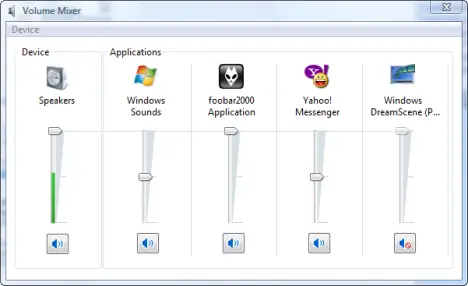
To configure the sound settings for each application move the level up or down. To mute/unmute an application, just click on the speaker button beneath it.
Related articles:
Put the Volume Mixer icon back on your taskbar
Sound Recorder
Disable the Windows Vista Startup Sound
Disable the System Beep
Pimp My Windows Vista: How to change your sound scheme
Recommended articles:
Fix for When Clock, Volume, Power or Network Icons are Missing and Grayed Out in Windows Vista

This work is licensed under a Creative Commons Attribution-Noncommercial 3.0 License.
Microsoft, Windows and the Windows logo are either registered trademarks or trademarks of Microsoft Corporation in the United States and/or other countries. Microsoft Corporation in no way endorses or is affiliated with www.vista4beginners.com.
All other products mentioned are registered trademarks and/or trademarks of their respective companies.
Comments
Excellent! Thanks!
Excellent! Thanks!
All good and well. BUT
All good and well.
BUT !!!!!! How about your bass and treble settings ??????
Where are those?
I can't find them. Please help.
How to enable line in? I can
How to enable line in? I can see it in the recording panel, but not the playback panel in the volume mixer. Any ideas? The line in definitely is definitely working as i can record the sound, but it doesn't play the sound "live". Hope I'm making sense.
details
vedel, the Volume Mixer doesn't have bass or treble controls. You can control those settings thru Winamp, Foobar or any other third party software that has support for those settings.
W. H. Looi, in order to enable sound for the line-in connection you will have follow these steps:
1. Open Audio Devices and Sound Themes by clicking the Start button , clicking Control Panel, clicking Hardware and Sound, and then clicking Sound.
2. Click the Playback tab, click Speakers, and then click Properties.
3. Click the Levels tab, and then, under Line In, click the Mute button to enable sound for the line-in connection.
no line in/mic/etc on Levels tab
George, I need your help. I followed your steps. But at the third step, I couldn't find Line In, mic, or etc. It's only Speaker/Headphone displayed there. How can I enable the line-in? The line-in and mic are only displayed on Recording tab, not the Playback tab (step 2). So, how can I hear the sound from line-in or mic directly, without recording it first. Thanks. Sorry about my bad English.
Thank you so much!!! M$ have
Thank you so much!!! M$ have made things so difficult in Vista.
How can I switch
How can I switch automatically from speakers to headphones (normal non-USB ones). It used to work but now, I have either to set the one of the other as default or (doesn't always work) simply restart the application. Any settings somewhere?
Beside that, the volume mixer crashed around 4 times while I was trying around...
Problem with Line In.
I use a voice chat program called Ventrilo and I wanted to play music in our music channel for my friends. So I got the instructions on how to and windows vista doesn't have a stero mix selection in Ventrilo. So I figured Line in was what I should use and I can not get my Line in, in the control panel to set to "working" and not "currently unavailble" Is there something I am missing?
windows vista and delphi
how to readjust windows vista in delphi programming?
Enable
In Control Panel -> Sound -> Recording tab, right click on the Line In icon and select Enable from the menu. Hope it works.