
Windows Memory Diagnostics Tool
Fri, 03/16/2007 - 09:23 — Ciprian
 Windows Memory Diagnostics Tool is a very useful troubleshooting application included in the Windows Vista operating system. There are times when your computer might start to fail and freeze or reboot on its own. This tool can help you to detect if these problems are caused by memory errors or not. It tests the Random Access Memory (RAM) on your computer and reports the errors that are found.
In this guide we will show you how to use this tool for troubleshooting memory problems.
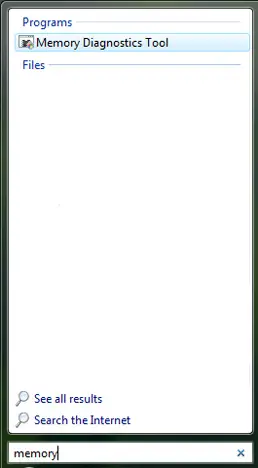
Windows Memory Diagnostics Tool can be found by typing the word "memory" or "MdSched.exe" in the Start Menu search field.
Also, the mdsched.exe file can be found in the C:\Windows\System32 folder.
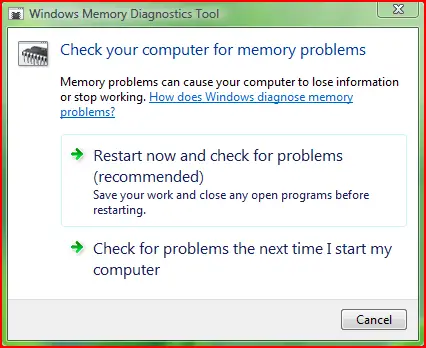
When the program starts you have two options: Restart now and check for problems or Check for problems the next time I start my computer. Choose the option you prefer.
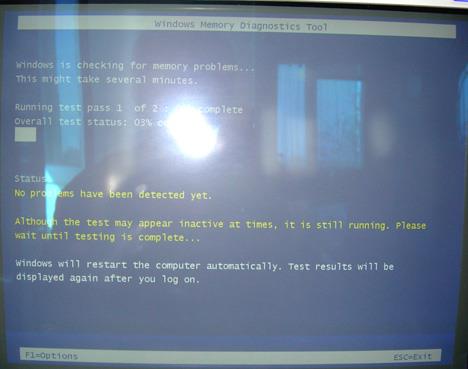
When the computer is restarted the Windows Memory Diagnostics Tool starts automatically. While the tool runs, you will see a progress bar indicating the status of the test.
Windows Memory Diagnostics Tool offers some configuration options. To access them, press F1 and the following screen will be loaded.
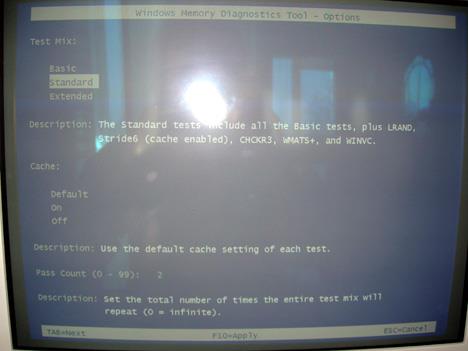
Here you can adjust the following settings:
- Test mix - Choose what type of test you want to run: basic, standard or extended.
- Cache - Choose the cache setting you want for each test.
- Pass count - Type the number of times you want to repeat the tests.
To apply the selected configuration options, press the F10 key and Windows Memory Diagnostics Tool will make the memory test according to your options.
Once the test is done, Windows Vista will restart automatically.
If the Memory Diagnostics Tool does not find any errors, you'll get a message that no errors were found. If the Memory Diagnostics Tool detects problems with your computer's memory, contact your computer or memory manufacturer for information about fixing the problem.
Related articles:
Check your system health with the Reliability and Performance Monitor
Check your System Stability Index
Solve your computing problems with Problem Reports and Solutions
Troubleshoot Driver Problems Using DPC Latency Checker

This work is licensed under a Creative Commons Attribution-Noncommercial 3.0 License.
Microsoft, Windows and the Windows logo are either registered trademarks or trademarks of Microsoft Corporation in the United States and/or other countries. Microsoft Corporation in no way endorses or is affiliated with www.vista4beginners.com.
All other products mentioned are registered trademarks and/or trademarks of their respective companies.
Comments
fix for problems found after using mem diagnostics tool
Would doing a restore point reload fix my memory problems?
Post new comment