
How to configure your startup programs
Wed, 03/07/2007 - 10:06 — George
 Lots of people have the tendency to install their applications using the default installation options. When they have to choose between a "Typical" installation and a "Custom" one, they always choose the first option. Typical installations are easy and require less input from the user but they also install lots of additional modules and settings that are not needed.
The most common problem caused by the use of typical installation options is the fact that you have a big chance of having a bloated system that loads lots of useless programs at every startup. Even if you have powerful hardware, your system will become slower and less responsive with each new program added to the startup list.
However, this problem can be solved easily. If you look carefully in the configuration options of your installed applications, you might find an option that enables you to remove them from the programs startup list. If you don't, all you need to do is to edit the startup list manually using the System Configuration utility.
There are several ways to find the System Configuration utility. You can go to Control Panel, turn on the Classic View and then go to Administrative Tools.
Alternatively, you can type system configuration or msconfig in the Start Menu search field.
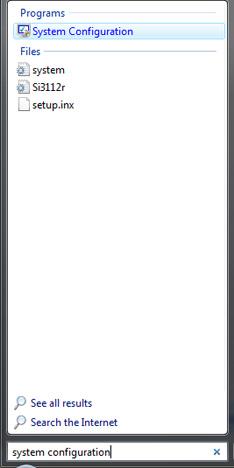
Open System Configuration by clicking on the search result or by pressing the Enter key. You will see several tabs: General, Boot, Services, Startup and Tools.
Click on the Startup tab and you will see the programs that are loaded at each Windows startup.
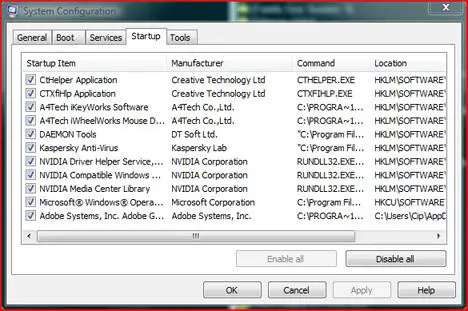
You can choose to disable some of these programs but before you do that please make sure you do not disable any important system components or drivers. You might damage the functionality of the operating system. If you are not sure on what you are doing it is better not to disable any startup programs.
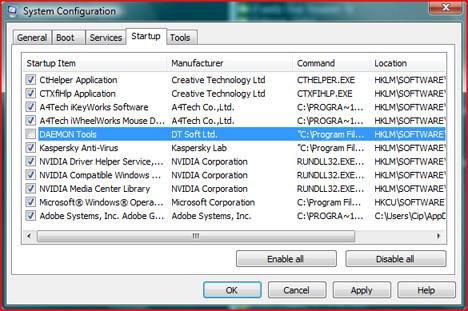
If you know what you are doing and which programs you want to disable, just uncheck the small box from the left side of the appropriate programs. When you have finished, click Apply and/or OK.
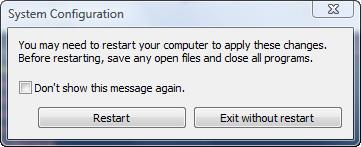
A new window will appear asking if you want to restart the computer. Choose the option you prefer.
After you reboot you will be warned that Windows blocked some start-up programs.
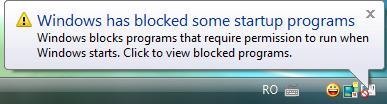
In order to remove this warning, click on the icon and then, from the pop-up menu, select Run blocked program and then click on System Configuration Utility. You will see a pop-up window, where you are warned once again that you have changed the way Windows starts. Select the option that says Don't show this message or start System Configuration when Windows starts and then click on OK.
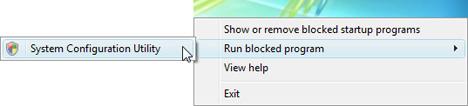
From now on, if you make other changes in the System Configuration utility, you won't be bothered by warnings anymore.
Related articles:
Streamline your Startup Applications & Improve Windows Performance
How To Disable Sync Center From Running At Startup
What software should I install on my PC?
How to boot in safe mode
The 9 commandments for an enjoyable computing experience

This work is licensed under a Creative Commons Attribution-Noncommercial 3.0 License.
Microsoft, Windows and the Windows logo are either registered trademarks or trademarks of Microsoft Corporation in the United States and/or other countries. Microsoft Corporation in no way endorses or is affiliated with www.vista4beginners.com.
All other products mentioned are registered trademarks and/or trademarks of their respective companies.

Comments
Urgent Help Reqired
Its a very good artical for the vista beginners. But unfortunately I read it after I have made a mistake and of course I am beginner.
You quoted in your artical:
'' You can choose to disable some of these programs but before you do that please make sure you do not disable any important system components or drivers. You might damage the functionality of the operating system. If you are not sure on what you are doing it is better not to disable any startup programs. ''
And I disabled some of the programms that were required for the correct functionality. Now, when I plug-in my microphone knob into its respective slott, there is no pop up window indicating that a microphone has been detected. Furthermore, my voice is not being transmitted into the microphone probably due to the fact that i have disabled some of the important start-up programms.
Can you please tell me how I can get myself out of this big trouble.
Thanks Alot.
Take Care.
b.exe how can i remove this from windows explorer
Problem signature:
Problem Event Name: BEX
Application Name: b.exe
Application Version: 0.0.0.0
Application Timestamp: 45dd10a5
Fault Module Name: b.exe
Fault Module Version: 0.0.0.0
Fault Module Timestamp: 45dd10a5
Exception Offset: 0000821b
Exception Code: c0000005
Exception Data: 00000008
OS Version: 6.0.6001.2.1.0.768.3
Locale ID: 16393
Additional Information 1: 7cec
Additional Information 2: bf8e8f60e722e92c7ed8303916591ab4
Additional Information 3: f52c
Additional Information 4: 1f2049078c96a6d5be095394f9e59d30
more than one anti-Virus, malware etc.
A month ago my system got infected with Packed.Hidden malware. It infected many processes and windows explorer, and then pretty much every file I opened. I had AVG free installed but all it could do was identify. Then I obtained avast 4.8, and it did some better, eventually managing to clear it, but I found some more viruses with AVG that avast had not been able to catch. And yet again when I ran spybot, it too caught some more that both AVG and avast had not been able to catch.
Many months ago I had the same experience with Windows Defender. I had it turned off when I was running McAfee, but when I turned it on, it caught some extra viruses.
Looks like one antiVirus does not do the trick. Can I leave all the AVG, avast, Defender, and spybot on?
how to add microsoft outlook
how to add microsoft outlook 2010 only when vista startup.
Yes but this doesnt work for
Yes but this doesnt work for Vista because the sysconfig option doesnt show, only the blocked program!
What about If I want to ADD a
What about If I want to ADD a startup program which is not shown at the system configuration? What can I do?
I have followed your
I have followed your instructions and unchecked some useless programs but an error message opens warning me that i do not have administrator account to make changes?
I checked and rechecked, and I am the only administrator of my pc.
I have built my pc from bare bone system and installed xp and all the new updates.
how can resolve this denial log to administrator resources?
Adding?
Nice info! How do you add apps to your startup-list then?
I've made some own stuff that I want to have started in the same go as windows starts. I'm working on an own explorer and stuff.
Btw, I'm using XP atm.
Post new comment