
What is Windows Malicious Software Removal Tool (mrt.exe) and how to use it
 The Windows Malicious Software Removal Tool was always a very enigmatic Windows Update for me. I always installed it both on my Windows XP and Windows Vista PCs and never really understood how it works and if it works. After I installed it, I did not see any new shortcuts or programs running in the background, not even new notification messages. It was as if I installed an update which did not do anything.
Recently, I went to one of my friend's house and installed Windows Vista on his PC. Of course, Windows Update installed Windows Malicious Software Removal Tool on his PC as well. When he asked me about this tool and how it works, I was not able to give him any answers. To answer his questions and any of your questions about this tool, I decided to do a little digging and write this article to share with you all there is to know about the Windows Malicious Software Removal Tool.
What is Windows Malicious Software Removal Tool (mrt.exe)?
Microsoft Windows Malicious Software Removal Tool is basically a free tool which helps to remove specific malicious software from computers which run Windows operating systems, including all versions of Windows Vista. This tool is updated on the second Tuesday of every month and it is distributed via Windows Update. After it is installed, it silently runs in the background and removes the malicious software that it finds. When the detection and removal process is complete, the tool generates a report describing the outcome of the scan. The report can be found in a log file named 'mrt.log' placed in the 'C:\Windows\Debug' folder.
Even though this tool helps you remove malicious software, it should never be used as a replacement for an antivirus program. That's because this tool has a very limited database of malicious software and searches only for specific threats. Also, it is updated on a monthly basis unlike antivirus solutions which are updated daily.
Where to find it
By default, the tool can be found in the 'C:\Windows\System32' folder. Once you open this location, search for a file called mrt.exe.
If you don't find this file, it means that this tool is not installed on your PC. In this case you can download it directly from the Microsoft Download Center. The 64 bit version can be found here.
How to use it in interactive mode
If you want to run this tool manually, go to the location mentioned above and double click the mrt.exe file. An easier way is to type mrt.exe in the Start Menu Search Box or in the Run window.
Alternatively, you can download the Windows Malicious Software Removal Tool Shortcut we have attached to this article, place it on your desktop and use it each time you want.
When the tool starts, you will receive an UAC prompt. Click Continue and the tool will start.
When you see the Welcome window, click Next.
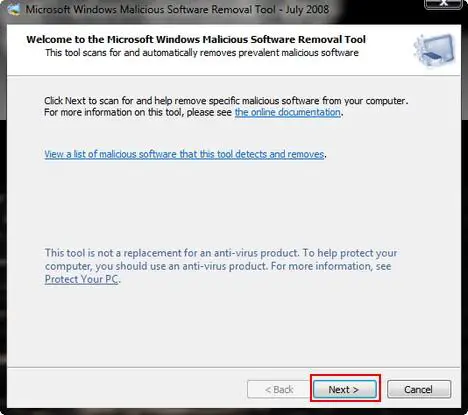
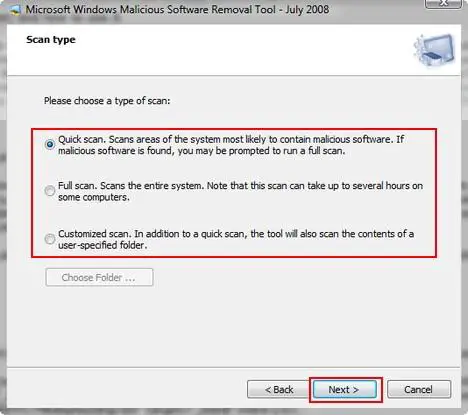
Now you need to select the type of scan you want the tool to perform. You have three possible options: Quick scan, Full scan and Customized scan. If you did not scan your PC before and you don't have a reliable antivirus solution installed, you might want to select Full scan. Once you selected the option you prefer, click Next.
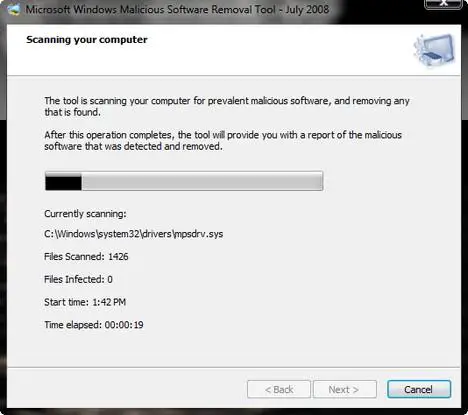
The tool will start to scan your computer and show you the status of the scan.
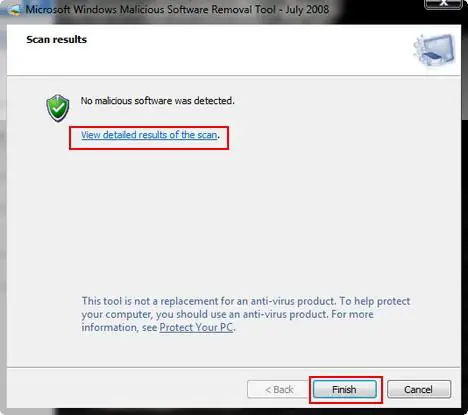
When finished you will see the results. In my case, no malicious software was detected. Now click Finish and the tool will close.
How to use it from the Command Prompt
You can use this tool from the Command Prompt as well. To use it, right click the Command Prompt shortcut and select 'Run as administrator.
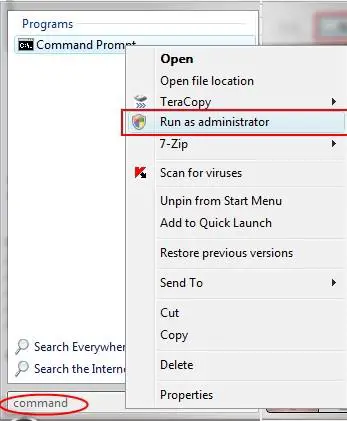
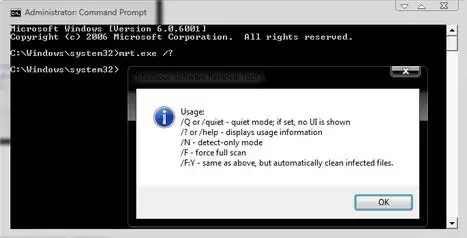
Now type 'mrt.exe ' followed by one of these possible switches:
- /Q or /quiet - runs the tool in quiet mode. This option suppresses the user interface completely;
- /N - runs in detect-only mode. In this mode, any detected malicious software will be reported but it will not be removed;
- /F - performs a full scan of the computer without removing any infections that are found;
- /F:Y - performs a full scan of the computer and automatically cleans all the found infections;
- /? or /help - displays usage information.
If you are running the tool in quiet mode, you can find the log file mrt.log in the 'C:\Windows\Debug' folder. To easily open this file, you can download the attached shortcut, place it on your desktop and double click on it.
Related articles:
Protect your system from viruses for free
Protect your system from spyware for free
Protect your system from hackers for free
Windows Defender
Windows Firewall
Windows Vista Security Center
How to work with the new Windows Update

This work is licensed under a Creative Commons Attribution-Noncommercial 3.0 License.
Microsoft, Windows and the Windows logo are either registered trademarks or trademarks of Microsoft Corporation in the United States and/or other countries. Microsoft Corporation in no way endorses or is affiliated with www.vista4beginners.com.
All other products mentioned are registered trademarks and/or trademarks of their respective companies.
Comments
MRT.exe in a weird folder location?
Hello everyone,
I hope someone can help me here.
I am running Windows Vista Home Premium
Service Pack2 on a 64bit OS
My MRT.exe file is located in a folder titled 19a09944c6a71dc4d58e
when i first click on my harddrive c:
MRT.exe is the only file in the folder and i thought it was really weird,
should it be in a program files folder or something that seems like the right place for it why is it in its particular location? There is a folder with a similar weird letter/number combination below that^ folder but there is nothing in it.
I am worried that it may be malicious software like a virus or something.
I have a premium security suite and all my windows update installed so I feel i am secure to some extent(as much as i can be for a windows OS lol).
Can someone please help me or share your thoughts it will be very much appreciated!
Thank you very much!
MRT i weird folders
Hi, I have had similar thoughts.
It seems like these folders are spread out by Vista. I understand (by googleing the subject) that the MRT exefile is downloaded once a month and only used used once. It should be found in C:\Windows\System32.
Other locations are not default, and bad contents have been reported according to google answers.
I ran Mbam just in case but it found nothing. So I just deleted all these weird folders containing MRT.
Why they are spread out like this is hard to say, but Vista is by default having Pagefiles spread out over all HDDs' partitions present.
I have for privacy reasons chosen to remove the ticks (in advanced system settings) from all partitions exept C: (System partition), in order to have paging only on C:
Since then the MRT spread-out seems to have stopped.
Remains to be seen if this is a coincidence though - I can't tell yet.
Hope this was helpful.
malicious removal tool
I believe this update will spoil your machine if you are not using a genuine version of windows XP.
That is it will add a screen that shouts PIRATE when you log on and sugests you call microsoft to report where you bought your copy etc.
Am I right?
MRT
MRT= Microsoft Rootkit tool
If you like to have a program that does not do what it says, and tracks state of your OS and then sends out secret data to M$..
Then this is for you!
mrt.exe
Is it OK to remove mrt.exe? will it cause problems? I have Windows 7. I checked my system resource usage, and this thing takes up a huge amount of resources while apparently duplicating monthly what my Norton 360 already does daily. I'm willing to take a chance and get rid of it, if it won't mess up anything else to remove it. any advice on proper removal and how to keep it from re-inserting every month would be really helpful. thanks.
the truth about windows software removal tool
The truth is that this software has a limited database at best. It is my 'opinion' that this tool was developed for one purpose and one purpose only, to keep people from pirating MS Windows software and other MS products. This is why MS tries to keep it in the updates even though it isn't really needed (again, in my 'opinion'). MS Windows protects itself from piracy of it's products in three (3) basic ways.
1. Product Installation Key of varying types - VLK for volume license key, DLK for Developer (checked against it's servers, where your machine is considered pirated if the key is ever blacklisted).
2. Activation depending on which version you have.
3. Windows Genuine Advantage program verified by the.... you guessed it "Windows Malicious Software Removal Tool".
I hope you enjoyed reading. In my 'opinion', you have a legal right to know what it is that the software does.
Windows Malicious Software Removal Tool
Hi. Great article. Quick question, when I decided to run it, how come it scanned over 300,000 files while my McAfee A/V only scanned over 79,000 files? Is this accurate? Why would Windows Malicious Software Removal Tool seem to scan more files than McAfee?????
Post new comment