
Change the System Restore Frequency with CSRF v1.0.0.0
Tue, 03/13/2007 - 15:10 — Ciprian
 According to Windows Help and Support, a restore point is a representation of a stored state of your computer's system files. Restore points are created by System Restore at specific intervals and when System Restore detects the beginning of a change to your computer. If no important system changes are made, restore points are created once per day.
However, there are cases in which you might need to change the creation of restore points frequency on your computer. To do that, you need to use the Registry Editor and edit the value of a key called RPGlobalInterval that can be found in HKEY_LOCAL_MACHINE\SOFTWARE\Microsoft\Windows NT\CurrentVersion\SystemRestore.
If you are not very familiar with the Windows registry and you are not very sure on what you are doing, you might have problems when changing settings in the Windows Registry. This is why we created a tool called CSRF (Change System Restore Frequency).
CSRF is a small tool that allows you to change the frequency for the creation of restore points without having to use the Registry Editor.
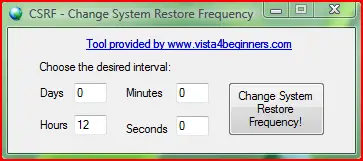
You don't have to be a computer geek to know how to use it. You just run it, enter the desired interval between the creation of restore points and press the Change System Restore Frequency! button. That is it!
All you need to do is make sure you have administrator permissions as CSRF doesn't work if you are a standard user.
CSRF is distributed using a Creative Commons Attribution-Noncommercial 3.0 License.
This tool is offered "as is" with no warranties. CSRF was designed and tested on Windows Vista and on our systems it worked with no problems. Also, it should work on systems with Windows XP and .NET Framework 2.0 installed. If you discover any bugs please feel free to report them to us.
Related articles:
System Restore
Change the amount of space used by System Restore
How to disable or enable System Restore
Change Owner v1.0
Recommended articles:
Change How Often System Restore Creates Restore Points in Windows Vista
| Attachment | Size |
|---|---|
| CSRF_1_0.zip | 121.36 KB |

This work is licensed under a Creative Commons Attribution-Noncommercial 3.0 License.
Microsoft, Windows and the Windows logo are either registered trademarks or trademarks of Microsoft Corporation in the United States and/or other countries. Microsoft Corporation in no way endorses or is affiliated with www.vista4beginners.com.
All other products mentioned are registered trademarks and/or trademarks of their respective companies.
Comments
CSRF not working
I have downloaded this file and tried to run it but it comes back with an error:
The application failed to iitialize properrly. (0xc0000135). Click on OK to terminate the application.
Any suggestions or advice as to how to get this to run?
Chuck
Recovery File
I believe the 'Recovery File' has been moved from it's original location. Could you tell me where it belongs?
System restore worked yesterday....then someone did some drag & drops.....thus moving the Recovery File's location.....the system restore no longer works.
Thanks!
Problem with the CSRF tool
I too downloaded the CSRF tool. When I tried to run it I got "Application not found" I downloaded it 3 times and same result all 3 times.
When my computer got setup it was setup to only do the daily restore point. I want the option of more restore points. Is there some way to accomplish this??
Screenshot please
Please make a screenshot of the problem showing the selections you made and the error you receive.
Send it to me via e-mail or post a link here, on this page and I will investigate.
screen shot
Ciprian
I have the screen shot parked in "my pictures", I don't know how to get it to you, (don't know your e-mail address and I can't seem to paste the thing here. I used the download on this page "CSRF_1_0.zip" I downloaed it to my desk top, double clicked it to open it.
The message that opened it a blue and white box. it has a red X in a circle. next to it it says C:\Users\owner\Desktop\CSRF_1_0.zip A couple of lines below that it says Application not found, then in the bottom corner is a box with an OK in it. When you click the OK it goes away.
E-mail address
E-mail is vista4beginners at gmail dot com
Post new comment