
How to turn on or off the Windows Vista Firewall
Sun, 10/14/2007 - 14:46 — George
 There are cases when, for different reasons, you might need to disable or enable the Windows Vista's firewall. In this short tutorial we will show you how this can be done. Just follow the steps described below and you will be done in no time.
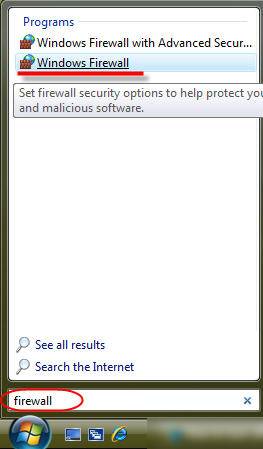
The easiest way to find the Windows Vista Firewall is to type the word firewall in the Start Menu search box. You will see these two results: Windows Firewall with Advanced Security and Windows Firewall. Click on the second result and the main window of Windows Firewall will open.
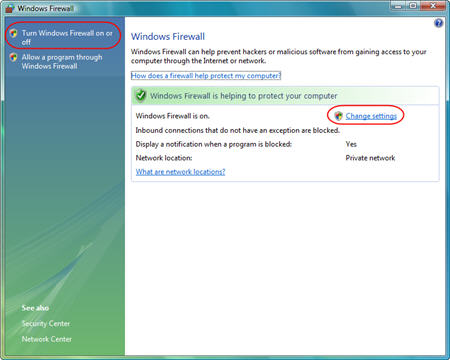
Now, click on the Turn Windows Firewall on or off link, from the left, or click the Change settings link, from the right. Both links will open the Windows Firewall Settings window.
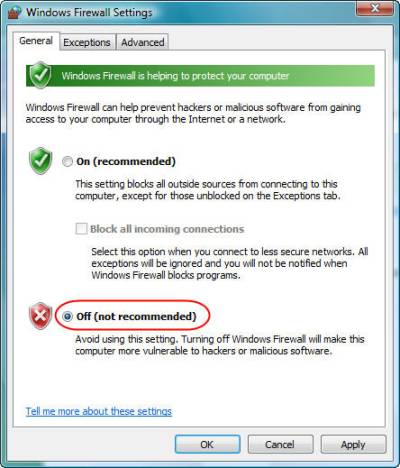
By default, the On (recommended) setting will be enabled. Select Off (not recommended) to turn off Windows Firewall and then click on OK.
This is how the main window of Windows Firewall will look like after you have turned off the firewall. If you want to revert to the old settings and enable Windows Firewall, click on the Update settings now link.

Related articles:
Windows Firewall
Windows Vista Security Center

This work is licensed under a Creative Commons Attribution-Noncommercial 3.0 License.
Microsoft, Windows and the Windows logo are either registered trademarks or trademarks of Microsoft Corporation in the United States and/or other countries. Microsoft Corporation in no way endorses or is affiliated with www.vista4beginners.com.
All other products mentioned are registered trademarks and/or trademarks of their respective companies.
Comments
Windows firewall
I have McAfee Security Centre and am confused as to whether I turn off Windows Firewall? If it's turned off I keep getting your computer is not secure, check your security settings.
Disable is ok
If you have another firewall, it is OK to disable the Windows Firewall. You don't need them both.
Windows Firewall
Diwith, i recommend using Comodo Personal firewall, or Zone Alarm, they are both free and very good firewalls
Here are some links: http://www.personalfirewall.comodo.com/
http://zonealarm.com/store/content/home.jsp
Security Center Alerts
Diwith, if you want to disable the alerts you receive when the firewall is off (like "your computer is not secure...") go to the Windows Security Center (type in the Start Menu search box "security center" to find it) and click on the "Change the way Security Center alerts me" link. Choose the last option and you should be "alerts free". :)
Windows Vista Security Center
You can find a tutorial about it here.
Vista firewall
I have Microsoft Live Onecare and hopefully after turning off firewall my computer is protected . It was knocked out by trying to use the Vista firewall at the same time but it does actually recommend you disabling any.Live Onecare works fine now.
limewire & vista
how do i get limewire to work on my with vista
LimeWire blog
Check this article from the Limewire blog: LimeWire and Vista
Vista Firewall wont trun on
I have tried everything to turn WIndows firewall back on - I had tried to install Live one care and it did not install correctly so I went back in to turn Windows Firewall back on - and it wont do it - I have tried to restore defaults to turn back on but nothing works?? Any help???
help
sky firewall is blocking certain web pages how do i switch that one off ?
Post new comment