
How to disable Windows Defender
Sun, 09/09/2007 - 20:25 — Ciprian
 Even if Windows Defender is offered for free and it has decent protection features, some people might prefer other applications to secure their system from spyware and other threats. In this case there is no point in having two similar applications running at the same time, both of them consuming system resources. This is why disabling Windows Defender can be a good idea.
This is how you do it:
Launch Windows Defender and go to Tools -> Options.
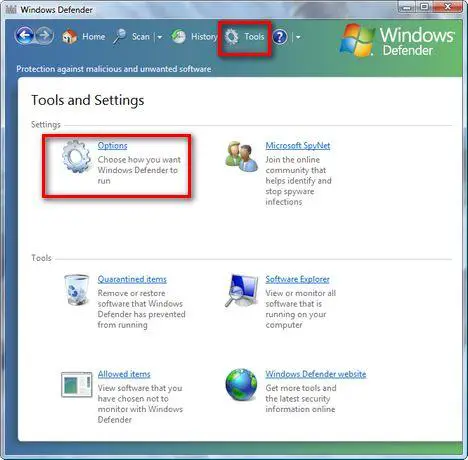
Here you will find a lot of configuration options. Scroll down to the end of the list. You will find there a section called Administrator options. Deselect the Use Windows Defender box and press the Save button.
If UAC is turned on, you will need to confirm that you want to continue with the change.

Now you will receive a notification saying that "Windows Defender is turned off". Click on Close and you are done.

Related articles:
Protect your system from spyware for free
What is Windows Malicious Software Removal Tool (mrt.exe) and how to use it
Windows Defender
Windows Defender's best feature - Software Explorer

This work is licensed under a Creative Commons Attribution-Noncommercial 3.0 License.
Microsoft, Windows and the Windows logo are either registered trademarks or trademarks of Microsoft Corporation in the United States and/or other countries. Microsoft Corporation in no way endorses or is affiliated with www.vista4beginners.com.
All other products mentioned are registered trademarks and/or trademarks of their respective companies.
Comments
windows defender
If you have cheap, free adware, spyware programs then yes you want all the free programs you can get, but don't run them at the same time. I have spy sweeper the best program on the planet for this stuff....so I don't need windows defender running in vista or anything else so I disable them. Free stuff is not that good..but better than anything until you can afford to step up to the plate.
I am Running nod 32 is it a
I am Running nod 32 is it a good idea to turn off windows defender?
Which product?
It depends. Which NOD32 product and version are you using?
Nod 32
Windows defender is ***
Nod32 is enough against spyware. But if you disable it, it's better to use other anti-spyware programs like Spybot S&D, SpywareBlaster and spywaredoctor. All for free!
i can't even open defender
today i'm having an error from windows defender on startup, I'm actually having it for a couple of days but it's really annoying. evrything works just fine, and now this happens...
i'm having the 0x800106ba error, I already searched the internet for it but never find a 100% solution for it.
I think that i have to uninstall windows defender, and maybe re-installing it then. i can't even open it now.
I'm running windows vista home premium
defender
i have exactly the same problem. i keep getting the same error and can't open windows defender at all. why is this happening and what can i do about it? i too am on vista and i have microsoft security essentials.
I have symantec endpoint
I have symantec endpoint security can i disable windows defender and firewall or only one of them or netiher.
Winblows Defendurrr
I was fixing up someone's computer two nights ago (Vista Home) and this thing was too busy blocking Peerguardian and AVG while letting malwares roam free like horses on acid. Maximum annoyance, minimum protection.
Thanks :D
Comodo Internet Security + Firewall = Complete protection.
hate the windows defender updates daily :\
thanks for this.
window defender and kaspersky internet security 2008
I have windows vista home premium and windows defender came on my computer when I bought it. I want to know if both of them can run on my computer or if I should turn off defender? Please help.
Post new comment