
How to disable Windows Defender
Sun, 09/09/2007 - 20:25 — Ciprian
 Even if Windows Defender is offered for free and it has decent protection features, some people might prefer other applications to secure their system from spyware and other threats. In this case there is no point in having two similar applications running at the same time, both of them consuming system resources. This is why disabling Windows Defender can be a good idea.
This is how you do it:
Launch Windows Defender and go to Tools -> Options.
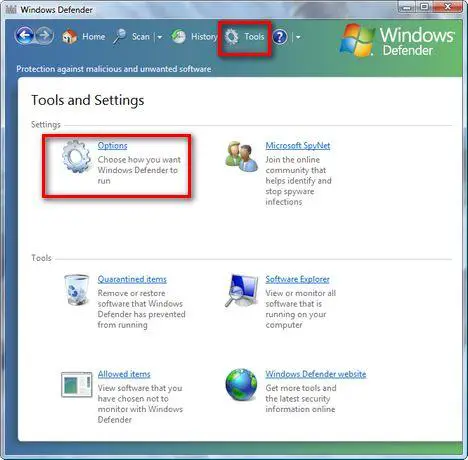
Here you will find a lot of configuration options. Scroll down to the end of the list. You will find there a section called Administrator options. Deselect the Use Windows Defender box and press the Save button.
If UAC is turned on, you will need to confirm that you want to continue with the change.

Now you will receive a notification saying that "Windows Defender is turned off". Click on Close and you are done.

Related articles:
Protect your system from spyware for free
What is Windows Malicious Software Removal Tool (mrt.exe) and how to use it
Windows Defender
Windows Defender's best feature - Software Explorer

This work is licensed under a Creative Commons Attribution-Noncommercial 3.0 License.
Microsoft, Windows and the Windows logo are either registered trademarks or trademarks of Microsoft Corporation in the United States and/or other countries. Microsoft Corporation in no way endorses or is affiliated with www.vista4beginners.com.
All other products mentioned are registered trademarks and/or trademarks of their respective companies.
Comments
It is up to you
You can leave them both turned on. However, Kaspersky provides anti-spyware protection just like Windows Defender.
If you notice some slow-downs, then disable Windows Defender and leave only Kaspersky turned on.
Constant Error with Defender
HELP! I installed McAfee and I am getting an error message at startup about Defender (cannot initialize). When I try to launch Defender to disable it, I get this error message. How can I disable if I cannot launch it? Thanks in advance.
windows defender
Since I installed Mcafee Security, I have been getting an error message code Ox800106a and windows defender fails to initiate. I am assuming that maybe McAfee has disabled the program on it's own. Not sure, please advise.
windows defender
I updated my McAfee program and starting getting the Defender error. I would like to stop the Defender program as suggested but I can't open Defender. An suggestions ?
Disable the Windows Defender service
In this case, go to services and disable Windows Defender. To learn how to do this, read this tutorial:
How To Manage Windows Vista Services.
How to disable this notification
Really need advice!!
last nite i got prompt notification that my pc have spyware threat.
after that, my pc keep prompt me with notification saying my pc need to remove the threat by using Window Antispyware 2009. (the notification will pop up every 15 sec and it really annoying). when i click the notification. one window will pop up and ask me to purchased the Window Antispyware 2009 in order to remove the threat. this pop up keep coming every thime i cancelled the notification. really troublesome. what should i do. will above guide help me to solve this.
FYI my OS is Vista Basic. Thanks for your future advice.
Do not install Windows Antispyware 2009
Windows Antispyware 2009 is a rogue antispyware solution. Instructions on how to remove it can be found here:
http://www.2-spyware.com/remove-pro-antispyware-2009.html
Picture motion browser
I have a Picture motion browser software installed in my computer and getting an error the "application failed to initialize " and the computer wont restart. When I removed PMB the computer works fine. I tried to disable windows defender and then install PMB and it work perfectly fine and I can transfer the vidoes to my PC. But when I enable defender it gives the error right away after restarting my computer and wont allow me to access defender not unless I uninstall the PMB. I am using a vista 64 bit
Any suggestions.. Help!!
Upgrade Picture Motion Browser
Disable Windows Defender and uninstall the current version of Picture Motion Browser you have installed.
Go to the Sony site: http://support.sony-europe.com/dime/downloads/downloads.aspx?site=odw_en...
and download the latest version of Picture Motion Browser. As I understood it fixes some issues on Windows Vista and can be used on Windows Vista 64-bit.
If you still have issues and Picture Motion Browser works fine with Windows Defender disabled, then keep it disabled and use other anti-spyware programs. You can find free alternatives on our site.
using windows defender with AVG
hey guys, what do you think of turning off windows defender over AVG's own anti-spy module? I'm using AVG and it's kinda good, so would like to know what you think.
Post new comment