
How to disable Windows Defender
Sun, 09/09/2007 - 20:25 — Ciprian
 Even if Windows Defender is offered for free and it has decent protection features, some people might prefer other applications to secure their system from spyware and other threats. In this case there is no point in having two similar applications running at the same time, both of them consuming system resources. This is why disabling Windows Defender can be a good idea.
This is how you do it:
Launch Windows Defender and go to Tools -> Options.
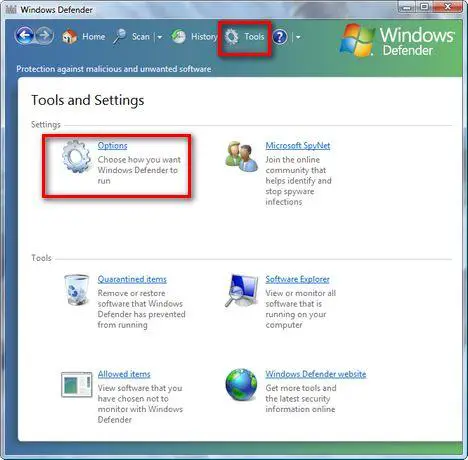
Here you will find a lot of configuration options. Scroll down to the end of the list. You will find there a section called Administrator options. Deselect the Use Windows Defender box and press the Save button.
If UAC is turned on, you will need to confirm that you want to continue with the change.

Now you will receive a notification saying that "Windows Defender is turned off". Click on Close and you are done.

Related articles:
Protect your system from spyware for free
What is Windows Malicious Software Removal Tool (mrt.exe) and how to use it
Windows Defender
Windows Defender's best feature - Software Explorer

This work is licensed under a Creative Commons Attribution-Noncommercial 3.0 License.
Microsoft, Windows and the Windows logo are either registered trademarks or trademarks of Microsoft Corporation in the United States and/or other countries. Microsoft Corporation in no way endorses or is affiliated with www.vista4beginners.com.
All other products mentioned are registered trademarks and/or trademarks of their respective companies.
Comments
Windows Defender
I used to use Windows Defender when i had McAfee and the realtime protection did actually work when McAfee was sleeping.
Disable Windows Defender
I have noticed the Windows Defender slows my computer down, I have now diabled it and I am using an anti virus called ESET NOD32, along with that I scan my comp. with malwarebytes once a week, is this sufficient?
this doesn't work for me
hi, i tried this but i can't get nowhere. windows defender won't let me go to a tools then options page. anytime i click it goes to a scan and says my computer is infected and wants me to upgrade. there is a spot called configuration where it looks like i could uncheck launching windows security at startup BUT it is gray and i cannot click on any of it. i already have mcaffee virus protection and ran a full scan and have updated virus protection so i think windows is trying to get me to pay for the full upgrade version. i just want to stop the popups on the bottom right of the screen saying my computer is infected, tracking software found, etc, etc. then the vista internet security center will pop up and the scan will come on. so annoying. i tried to go to msconfig and stop this at startup but that doesn't seem to work. do you know of any other things i can try to stop this. please help! please email at [email protected].
If you can get to the options
I don't get the administrative options - the program says I need to be an administrator which I am but still can't switch the thing off.
Can't do this
I want to disable Windows Defender, because its blocking my access to the Internet. I tried to do what you said, but when I opened Windows Defender, there's no toolbar across the top that says Tools. It doesn't look the same. Is that because it isn't activated? I turned it on by mistake, and I really want it off. Any ideas? Thanks, xx
Norton Internet Security 2010/Disabled Windows Defender
I run Norton Internet Security 2010, is it safe to assume with all fetures it offers running, Windows Defender is no longer needed? This is ran on the 64 bit version of Vista Premium. TY
Windows Defender problems
I have Hughes Net and I keep getting Windows Defender downloads, even though I have disabled it, turned it off, and basically tried to remove it from the system. I already have Norton 360.
Because Hughes Net will only let me download a certain percentage and if that number is reached, my computer slows and sometimes stops.
How do I get defenders to stop???? I am soooo angry!
why does an error screen
why does an error screen appear when i deselect the 'use windows defender' box and then clicked save changes?
Security
I have Microsoft Secutity Essentials, should i also have Windows Defender?
Security
I have Microsoft Secutity Essentials, should i also have Windows Defender?
Post new comment