
How to disable Windows Defender
Sun, 09/09/2007 - 20:25 — Ciprian
 Even if Windows Defender is offered for free and it has decent protection features, some people might prefer other applications to secure their system from spyware and other threats. In this case there is no point in having two similar applications running at the same time, both of them consuming system resources. This is why disabling Windows Defender can be a good idea.
This is how you do it:
Launch Windows Defender and go to Tools -> Options.
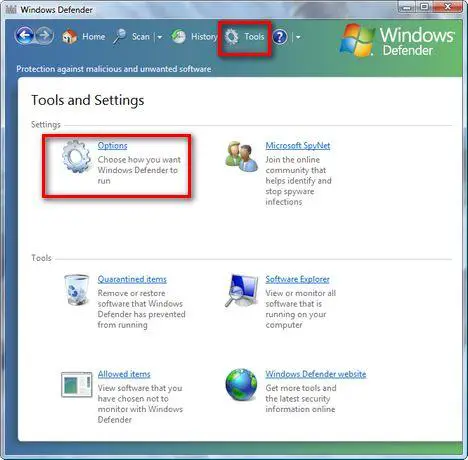
Here you will find a lot of configuration options. Scroll down to the end of the list. You will find there a section called Administrator options. Deselect the Use Windows Defender box and press the Save button.
If UAC is turned on, you will need to confirm that you want to continue with the change.

Now you will receive a notification saying that "Windows Defender is turned off". Click on Close and you are done.

Related articles:
Protect your system from spyware for free
What is Windows Malicious Software Removal Tool (mrt.exe) and how to use it
Windows Defender
Windows Defender's best feature - Software Explorer

This work is licensed under a Creative Commons Attribution-Noncommercial 3.0 License.
Microsoft, Windows and the Windows logo are either registered trademarks or trademarks of Microsoft Corporation in the United States and/or other countries. Microsoft Corporation in no way endorses or is affiliated with www.vista4beginners.com.
All other products mentioned are registered trademarks and/or trademarks of their respective companies.
Comments
Trying to disable windows defender
How can I go to the tools when the application won't even open...got this message "failed to initialized..error code 0x800106ba.
windows defender
I have mcafee installed, but my windows defender pops up constantly and says i have no virus installation. It's very annoying. Should I disable it?
thank you
thank you for explaining the step by step on how to disable Defender. For some reason, I did not see the scroll bar and could not find Adm Options. Thanks so much!
Post new comment