
Windows Aero
Wed, 02/21/2007 - 00:21 — Ciprian
 In this tutorial we will speak about the new graphical interface for Windows Vista. It's name is Aero and it is an acronim for Authentic, Energetic, Reflective and Open. Aero it is intended to be the most powerful, efficient and aesthetically pleasing user interface ever included in a Windows operating system.
Aero looks very good, offering new glass and translucent effects for the Windows Vista menus and desktop. All this eye candy has its costs. If you want to run Aero with full effects you will need a system that meets the following minimum requirements: 1 GHz processor, 1GB of memory and a DirectX 9 compatible video card with 128MB of memory.
However, if you do not have a very powerful system or you want to squeeze a bit of performance from your system, you can easily customize the Aero interface.
This is how you do it:
First, enter the Control Panel and type "visual" in the search box, as shown in the screenshot below.
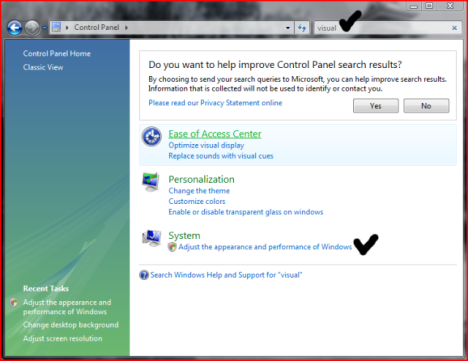
One of the results shown will be System - Adjust the appearance and performance of Windows. Click on it and the Performance Options window will be launched.
Click on the Visual Effects tab and make the configurations you want. If you do not want to disable Aero but you want more performance from your system we recommend that you turn off the transparency effects.
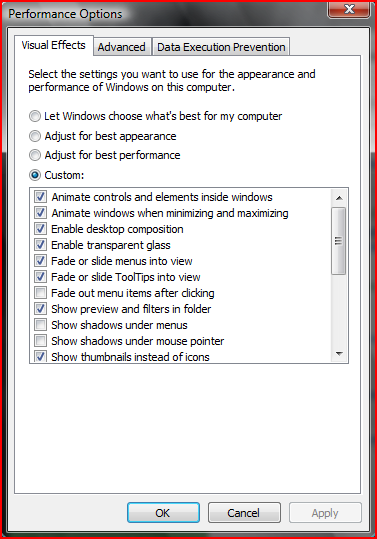
If you want to completely disable the Aero interface, click the Adjust for best performance checkbox. The Windows Vista interface will look very similar to the one in Windows 2000 but will not eat so much of your system's resources.
Related articles:
Pimp My Windows Vista
Pimp My Windows Vista: How to install new themes
Pimp My Windows Vista: Top Windows Vista Themes
Pimp My Windows Vista: How to change your logon screen
Windows DreamScene
Enhance Windows DreamScene with Stardock Dreams
How to change Window Color and Appearance

This work is licensed under a Creative Commons Attribution-Noncommercial 3.0 License.
Microsoft, Windows and the Windows logo are either registered trademarks or trademarks of Microsoft Corporation in the United States and/or other countries. Microsoft Corporation in no way endorses or is affiliated with www.vista4beginners.com.
All other products mentioned are registered trademarks and/or trademarks of their respective companies.
Comments
other languages
Hello
Instead of asking users to use the search box to change settings, you should guide them over normal icons, why? because there are many of us who visit your site and do not have an english-version of vista, so typing "visual" in a spanish installation won't list any results :)
just a thought
thanks
Post new comment